GitHub Copilot for Business at Imperial
What is GitHub Copilot for Business?
GitHub Copilot for Business is the enterprise version of GitHub Copilot, designed for organisations. At Imperial, all staff members access Copilot through a Business license rather than the individual Pro plan.
Benefits over the Pro plan
Copilot for Business provides staff with several advantages:
- Increased AI credits - More generous quota for AI-powered features
- Access to more powerful models - Use advanced large language models (LLMs) optimised for complex coding tasks
- Centralised billing and recharging - Simplified procurement and cost allocation to departments
- IP indemnity - GitHub defends you against claims that Copilot-generated code infringes third-party intellectual property
- Data privacy - By default, no Imperial data is used to train LLMs. Your code and conversations are not used to improve the models
Cost and billing
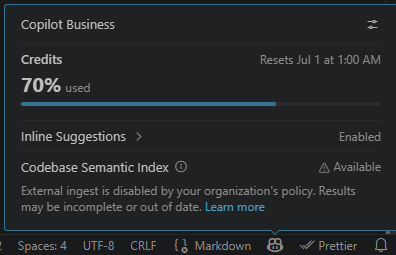
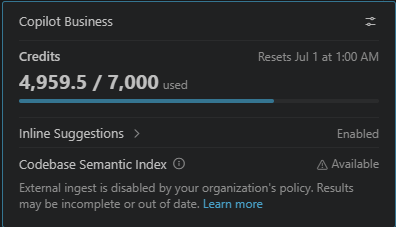
GitHub Copilot for Business costs $19 per user per month. This includes 1,900 AI credits. Once these credits have been exhausted, usage continues at published per-credit rates. Each user has a monthly allowance of additional AI credits beyond the default 1,900 credits. You can find your current allowance by clicking the GitHub Copilot icon in Visual Studio Code:
Funding depends on how you’re employed at Imperial.
Centrally funded staff
The cost for centrally funded staff is funded by the ICT department under a fair usage policy. A usage limit is set for each user (as described above). Once this limit is reached, most Copilot features will stop.
If you require additional usage beyond the fair usage limit, see Setting up paid GitHub Copilot billing.
Postgraduates
Postgraduates have no fair usage allowance. A GitHub Copilot for Business license is only available if your department or research project is willing to fund the $19 monthly license fee and any additional usage charges via a cost code before being being granted access - see Setting up paid GitHub Copilot billing.
Externally funded staff
Externally funded staff have no fair usage allowance. A GitHub Copilot for Business license is only available if your department or research project is willing to fund the $19 monthly license fee and any additional usage charges via a cost code before being granted access - see Setting up paid GitHub Copilot billing.
Next steps
To request a GitHub Copilot for Business license, see Requesting access.
Further reading
Page last modified: 30 Sep 2026.