
Pulling and Pushing
Last updated on 2026-01-28 | Edit this page
Estimated time: 15 minutes
Overview
Questions
- How do I keep my local branches in sync with the remote branches?
Objectives
- Push changes to a remote repository.
- Pull changes from a remote repository.
Multiple remote branches
Just as you can have multiple local branches, you can also have multiple remote branches. These may or may not be upstreams for your local branches.
As a reminder, remote and local repositories are not automatically
synchronised, but rather it is a manual process done via
git pull and git push commands. This
synchronisation needs to be done branch by branch with
all of those you want to keep in sync.
Pushing
Its basic use is to synchronise any committed changes in your current branch to its upstream branch:
git push.-
Changes in the staging area will not be synchronised.
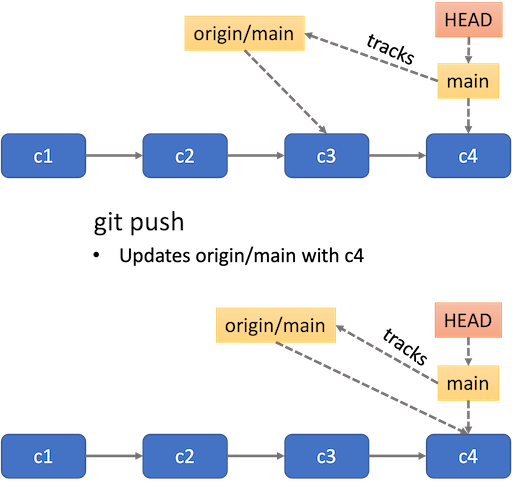 Summary of pushing a branch
 -
If the current branch has no upstream yet, you can configure one by doing
git push --set-upstream origin BRANCH_NAME, as done withmainin the example below. The--set-upstreamflag can be replaced by a shortcut-u. So you can usegit push -u origin BRANCH_NAMEinstead.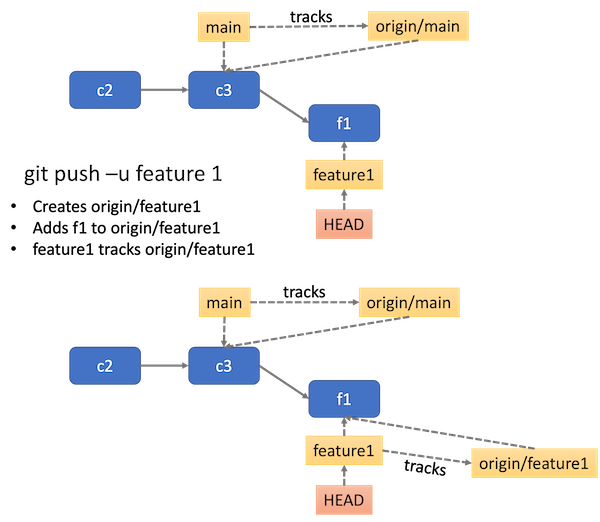 Push a branch without an upstream yet
 pushonly operates on your current branch. If you want to push another branch, you have toswitchto that branch first.If the upstream branch has changes you do not have in the local branch, the command will fail, requesting you to pull those changes first.
Let’s try to push changes to the main branch. First make
sure you are on the main branch.
OUTPUT
Switched to branch 'main'
Your branch is ahead of 'origin/main' by 6 commits.
  (use "git push" to publish your local commits)
Notice that git is suggesting you to use git push to
publish your local commits. Let’s do that:
OUTPUT
Enumerating objects: 21, done.
Counting objects: 100% (21/21), done.
Delta compression using up to 8 threads
Compressing objects: 100% (18/18), done.
Writing objects: 100% (18/18), 1.83 KiB | 938.00 KiB/s, done.
Total 18 (delta 4), reused 0 (delta 0), pack-reused 0 (from 0)
remote: Resolving deltas: 100% (4/4), completed with 1 local object.
To https://github.com/username/recipe.git
57d4505..d10e1e9 main -> mainNow you try
You should now be on the main branch. Try switching to
the spicy branch and pushing changes to it.
- Check the current branch using
git branch. - If the current branch is
main, then switch tospicyusinggit switch spicy. - Push changes to the
spicybranch usinggit push.
This should give an error that the current branch spicy
has no upstream branch:
OUTPUT
fatal: The current branch spicy has no upstream branch.
To push the current branch and set the remote as upstream, use

    git push --set-upstream origin spicy

To have this happen automatically for branches without a tracking
upstream, see 'push.autoSetupRemote' in 'git help config'.
Push again by setting the upstream:
OUTPUT
Enumerating objects: 5, done.
Counting objects: 100% (5/5), done.
Delta compression using up to 8 threads
Compressing objects: 100% (3/3), done.
Writing objects: 100% (3/3), 347 bytes | 347.00 KiB/s, done.
Total 3 (delta 1), reused 0 (delta 0), pack-reused 0 (from 0)
remote: Resolving deltas: 100% (1/1), completed with 1 local object.
remote:
remote: Create a pull request for 'spicy' on GitHub by visiting:
remote:      https://github.com/username/recipe/pull/new/spicy
remote:
To https://github.com/username/recipe.git
 * [new branch]      spicy -> spicy
branch 'spicy' set up to track 'origin/spicy'.
Pulling
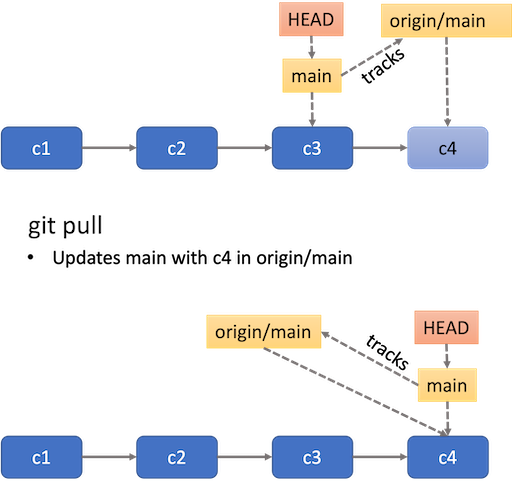
- Opposite to
push,pullbrings changes in the upstream branch to the local branch. - You can check if there are any changes to synchronise in the
upstream branch by running
git fetch, which only checks if there are changes, and thengit statusto see how your local and remote branch compare in terms of commit history. - It’s best to make sure your repository is in a clean state with no staged or unstaged changes.
- If the local and upstream branches have diverged – have different commit history – the command will attempt to merge both. If there are conflicts, you will need deal with them in the same way described above.
- You can get a new branch that exists only in
origindirectly withgit switch BRANCH_NAMEwhich will automatically create a local branch with the same name
- With
git pushyou can push any committed changes in your current branch to its upstream branch. - If the current branch has no upstream yet, you can configure one by
doing
git push -u origin BRANCH_NAME. - Using
git pullwill bring changes in the upstream branch to the local branch. - If the local and upstream branches have diverged (have different
commit history), then
git pullwill attempt to merge both. If there are conflicts, you will have to resolve them.