Formato¤
Introducción¤
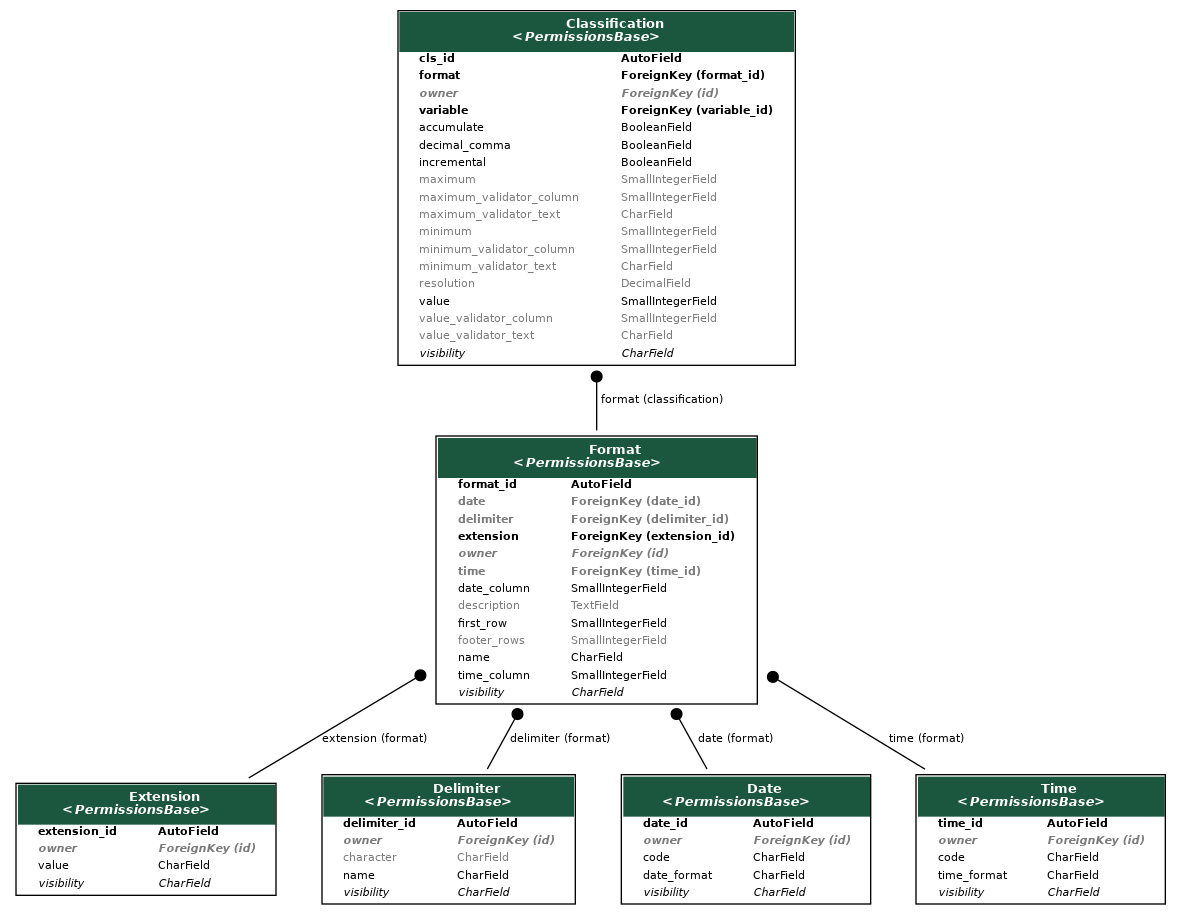
La aplicación de formato describe cómo se debe ingerir un archivo de datos: qué columnas considerar, qué variables contienen, el formato de fecha y hora, etc. Un resumen de los modelos involucrados se puede ver en el siguiente diagrama:
Componentes básicos¤
Extension
¤
Extension of the data file.
It is mostly used to choose the tool to be employed to ingest the data. While it can
take any value, there is currently explicit support only for xlsx and xlx.
Anything else will be interpreted as a text file and loaded using pandas.read_csv.
Attributes:
| Name | Type | Description |
|---|---|---|
extension_id |
AutoField
|
Primary key. |
value |
CharField
|
The extension value. eg. |
Functions¤
__str__()
¤
Return the string representation of the object.
Source code in formatting/models.py
44 45 46 | |
get_absolute_url()
¤
Get the absolute URL of the object.
Source code in formatting/models.py
48 49 50 | |
Delimiter
¤
Delimiter between columns in the data file.
One or more characters that separate columns in a text file. The most common values
are ,, ;, and \t (tab).
Attributes:
| Name | Type | Description |
|---|---|---|
delimiter_id |
AutoField
|
Primary key. |
name |
CharField
|
The name of the delimiter. eg. |
character |
CharField
|
The character used as a delimiter. eg. |
Functions¤
__str__()
¤
Return the string representation of the object.
Source code in formatting/models.py
78 79 80 | |
get_absolute_url()
¤
Get the absolute URL of the object.
Source code in formatting/models.py
82 83 84 | |
Date
¤
Date format.
Format string for the date column. It is used to parse the date column in the data
file. The format string must be compatible with the datetime module in Python. See
the datetime documentation
for more information on valid format codes.
Attributes:
| Name | Type | Description |
|---|---|---|
date_id |
AutoField
|
Primary key. |
date_format |
CharField
|
The format string for the date column in human readable
form, eg. |
code |
CharField
|
The code used to parse the date column, eg. |
Functions¤
__str__()
¤
Return the string representation of the object.
Source code in formatting/models.py
115 116 117 | |
get_absolute_url()
¤
Get the absolute URL of the object.
Source code in formatting/models.py
119 120 121 | |
Time
¤
Time format.
Format string for the time column. It is used to parse the time column in the data
file. The format string must be compatible with the datetime module in Python. See
the datetime documentation
for more information on valid format codes.
Attributes:
| Name | Type | Description |
|---|---|---|
date_id |
AutoField
|
Primary key. |
date_format |
CharField
|
The format string for the date column in human readable
form, eg. |
code |
CharField
|
The code used to parse the date column, eg. |
Functions¤
__str__()
¤
Return the string representation of the object.
Source code in formatting/models.py
155 156 157 | |
get_absolute_url()
¤
Get the absolute URL of the object.
Source code in formatting/models.py
159 160 161 | |
Componentes principales¤
Format
¤
Details of the data file format, describing how to read the file.
It combines several properties, such as the file extension, the delimiter, the date and time formats, and the column indices for the date and time columns, instructing how to read the data file and parse the dates. It is mostly used to ingest data from text files, like CSV. For Thingsboard imports, only the name, description and thingsboard fields are applicable.
Attributes:
| Name | Type | Description |
|---|---|---|
format_id |
AutoField
|
Primary key. |
name |
CharField
|
Short name of the format entry. |
description |
TextField
|
Description of the format. |
extension |
ForeignKey
|
The extension of the data file. |
delimiter |
ForeignKey
|
The delimiter between columns in the data file. Only required for text files. |
first_row |
PositiveSmallIntegerField
|
Index of the first row with data, starting in 0. |
footer_rows |
PositiveSmallIntegerField
|
Number of footer rows to be ignored at the end. |
date |
ForeignKey
|
Format for the date column. Only required for text files. |
date_column |
PositiveSmallIntegerField
|
Index of the date column, starting in 0. |
time |
ForeignKey
|
Format for the time column. Only required for text files. |
time_column |
PositiveSmallIntegerField
|
Index of the time column, starting in 0. |
thingsboard |
BooleanField
|
Whether the data is being imported from Thingsboard. |
Attributes¤
datetime_format
property
¤
Obtain the datetime format string.
Functions¤
__str__()
¤
Return the string representation of the object.
Source code in formatting/models.py
272 273 274 | |
clean()
¤
Validate the model instance.
Checks that the required fields for non-Thingsboard data are provided.
Source code in formatting/models.py
303 304 305 306 307 308 309 310 311 312 313 314 315 316 317 318 319 320 321 322 323 | |
datetime_columns(delimiter)
¤
Column indices that correspond to the date and time columns in the dataset.
Parameters:
| Name | Type | Description | Default |
|---|---|---|---|
delimiter
|
str
|
The delimiter used to split the date and time codes. |
required |
Returns:
| Type | Description |
|---|---|
list[int]
|
list[int]: A list of column indices. |
Source code in formatting/models.py
285 286 287 288 289 290 291 292 293 294 295 296 297 298 | |
get_absolute_url()
¤
Get the absolute URL of the object.
Source code in formatting/models.py
276 277 278 | |
Classification
¤
Contains instructions on how to classify the data into a specific variable.
In particular, it links a format to a variable, and provides the column indices for the value, maximum, and minimum columns, as well as the validator columns. It also contains information on whether the data is accumulated, incremental, and the resolution of the data. For Thingsboard imports, only the format, variable, accumulate, resolution and incremental fields are applicable.
Attributes:
| Name | Type | Description |
|---|---|---|
cls_id |
AutoField
|
Primary key. |
format |
ForeignKey
|
The format of the data file. |
variable |
ForeignKey
|
The variable to which the data belongs. |
value |
PositiveSmallIntegerField
|
Index of the value column, starting in 0. |
maximum |
PositiveSmallIntegerField
|
Index of the maximum value column, starting in 0. |
minimum |
PositiveSmallIntegerField
|
Index of the minimum value column, starting in 0. |
value_validator_column |
PositiveSmallIntegerField
|
Index of the value validator column, starting in 0. |
value_validator_text |
CharField
|
Value validator text. |
maximum_validator_column |
PositiveSmallIntegerField
|
Index of the maximum value validator column, starting in 0. |
maximum_validator_text |
CharField
|
Maximum value validator text. |
minimum_validator_column |
PositiveSmallIntegerField
|
Index of the minimum value validator column, starting in 0. |
minimum_validator_text |
CharField
|
Minimum value validator text. |
accumulate |
PositiveSmallIntegerField
|
If set to a number of minutes, the data will be accumulated over that period. |
resolution |
DecimalField
|
Resolution of the data. Only used if it is to be accumulated. |
incremental |
BooleanField
|
Whether the data is an incremental counter. If it is, any value below the previous one will be removed. |
decimal_comma |
BooleanField
|
Whether the data uses a comma as a decimal separator. |
Functions¤
__str__()
¤
Return the string representation of the object.
Source code in formatting/models.py
464 465 466 | |
clean()
¤
Validate the model instance.
It checks that the column indices are different, and that the accumulation period is greater than zero if it is set; the resolution is set if the data is accumulated; and that the value column is set if the import is not from Thingsboard.
Source code in formatting/models.py
472 473 474 475 476 477 478 479 480 481 482 483 484 485 486 487 488 489 490 491 492 493 494 495 496 497 498 499 500 501 502 503 504 505 506 507 508 509 510 | |
get_absolute_url()
¤
Get the absolute URL of the object.
Source code in formatting/models.py
468 469 470 | |