Variable¤
Introduction¤
The variable application deals with the variables that can be ingested by Paricia, from what they are and what units they use to resources to help in the validation process. Specially important in this validation process will be:
- the maximum and minimum values that the variable can realistically take (these are mandatory fields)
- the maximum variability between consecutive data points
- the maximum statistical difference with respect the series allowed for a data point before it is considered an outlier
- the fraction of missing values that are allowed when calculating reports
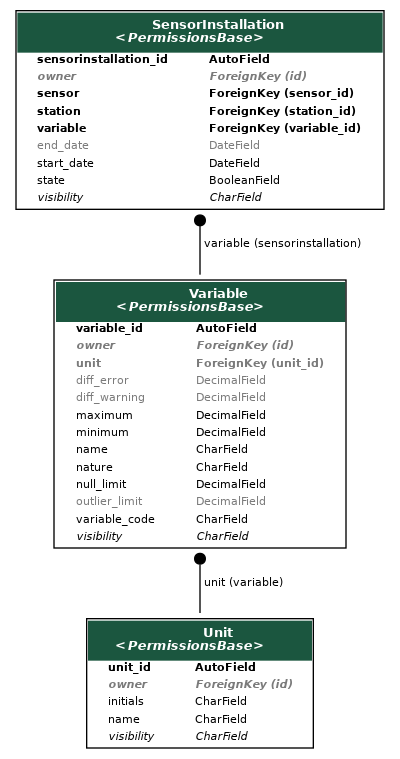
Components¤
Unit
¤
Unit of measurement with a name and a symbol.
Attributes:
| Name | Type | Description |
|---|---|---|
unit_id |
AutoField
|
Primary key. |
name |
CharField
|
Name of the unit, eg. meters per second. |
initials |
CharField
|
Symbol for the unit, eg. m/s. |
Methods:¤
__str__()
¤
Return the string representation of the object.
Source code in variable/models.py
42 43 44 | |
get_absolute_url()
¤
Get the absolute URL of the object.
Source code in variable/models.py
46 47 48 | |
Variable
¤
A variable with a physical meaning.
Such as precipitation, wind speed, wind direction, soil moisture, including the associated unit. It also includes metadata to help identify what is a reasonable value for the data, to flag outliers and to help with the validation process.
The nature of the variable can be one of the following:
- sum: Cumulative value over a period of time.
- average: Average value over a period of time.
- value: One-off value.
Attributes:
| Name | Type | Description |
|---|---|---|
variable_id |
AutoField
|
Primary key. |
variable_code |
CharField
|
Code of the variable, eg. airtemperature. |
name |
CharField
|
Human-readable name of the variable, eg. Air temperature. |
unit |
ForeignKey
|
Unit of the variable. |
maximum |
DecimalField
|
Maximum value allowed for the variable. |
minimum |
DecimalField
|
Minimum value allowed for the variable. |
diff_error |
DecimalField
|
If two sequential values in the time-series data of this variable differ by more than this value, the validation process can mark this with an error flag. |
outlier_limit |
DecimalField
|
The statistical deviation for defining outliers, in times the standard deviation (sigma). |
null_limit |
DecimalField
|
The max % of null values (missing, caused by e.g. equipment malfunction) allowed for hourly, daily, monthly data. Cumulative values are not deemed trustworthy if the number of missing values in a given period is greater than the null_limit. |
nature |
CharField
|
Nature of the variable, eg. if it represents a one-off value, the average over a period of time or the cumulative value over a period |
Attributes¤
is_cumulative
property
¤
Return True if the nature of the variable is sum.
Methods:¤
__str__()
¤
Return the string representation of the object.
Source code in variable/models.py
165 166 167 | |
clean()
¤
Validate the model fields.
Source code in variable/models.py
173 174 175 176 177 178 179 180 181 182 183 184 185 186 187 | |
get_absolute_url()
¤
Get the absolute URL of the object.
Source code in variable/models.py
169 170 171 | |
SensorInstallation
¤
Represents an installation of a Sensor at a Station, which measures a Variable.
It includes metadata for installation and finishing date, as well as state (active or not).
Attributes:
| Name | Type | Description |
|---|---|---|
sensorinstallation_id |
AutoField
|
Primary key. |
variable |
ForeignKey
|
Variable measured by the sensor. |
station |
ForeignKey
|
Station where the sensor is installed. |
sensor |
ForeignKey
|
Sensor used for the measurement. |
start_date |
DateField
|
Start date of the installation. |
end_date |
DateField
|
End date of the installation. |
state |
BooleanField
|
Is the sensor active? |