Measurement¤
Introduction¤
Any data ingested in or processed by Paricia takes de form of either Measurement or Report objects. Contrary to other elements of Paricia, these are not meant to be created manually via de Admin pages, but rather in the background when importing or when validating data.
Do not edit measurements in the Admin
Directly editing measurements in the Admin pages is discouraged since it can result in inconsistencies between raw, validated and reported data. Use the validation tools instead. See the validation section
In both cases, they represent a single data point in a time series, corresponding to a specific Variable at a specific Station. Only data corresponding to public stations will be available for checking in the case of anonymous users, whereas registered users could also check data from internal stations.
For the case of Reports, the data point is a post-processed magnitude averaged (or accumulated) over hourly, daily and monthly periods of time. Only data that has been validated is used when calculating the reports. Report data is what is used in the report view to generate plots, and can be downloaded. It is typically what most people will be interested in checking.
The Measurement represent an input data point loaded from a file, with all its properties and metadata. Most of its properties can be edited during the validation process, but the original raw data is always preserved and can be recovered when/if needed.
Both type objects derive from a MeasurementBase abstract class that contains the common elements, which in turns derives from TimescaleModel. This top parent class is the one that enables all the efficient time series management of the data in Paricia.
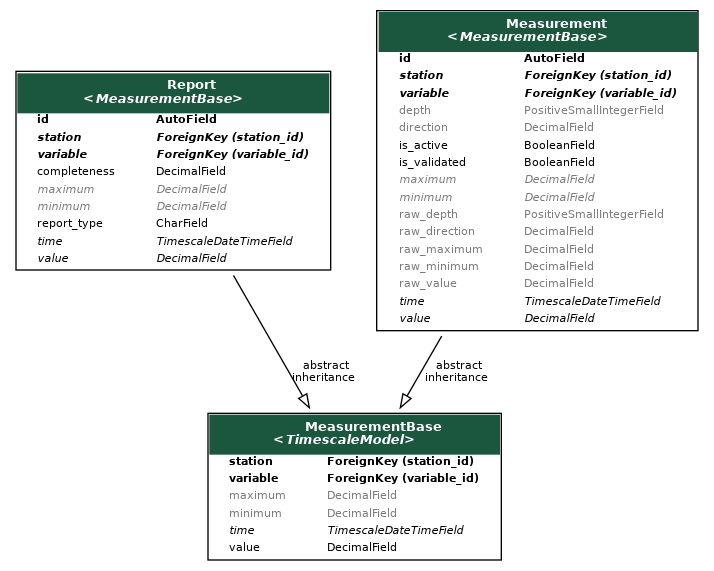
Components¤
MeasurementBase
¤
Bases: TimescaleModel
Base class for all the measurement related entries.
It contains the barebone attributes that any measurement entry will likely need, although this is enforced only for station, variable and value. Maximum and minimum are very likely to be present in most cases, but might not be there in some occasions, therefore the possibility of nulling them.
Attributes:
| Name | Type | Description |
|---|---|---|
time |
TimescaleDateTimeField
|
Time of the measurement. |
station |
Station
|
Station this measurement belongs to. |
variable |
Variable
|
Variable being measured. |
value |
Decimal
|
Value of the measurement. |
maximum |
Decimal
|
Maximum value of the measurement. Mostly useful for reports or when the measurement represents an average over time. |
minimum |
Decimal
|
Minimum value of the measurement. Mostly useful for reports or when the measurement represents an average over time. |
Measurement
¤
Class to store the measurements and their validation status.
This class holds the value of a given variable and station at a specific time, as
well as auxiliary information such as maximum and minimum values, depth and
direction, for vector quantities. All of these have a raw version where a backup
of the original data is kept, should this change at any point.
Flags to monitor its validation status, if the data is active (and therefore can be used for reporting) and if it has actually been used for that is also included.
Attributes:
| Name | Type | Description |
|---|---|---|
depth |
int
|
Depth of the measurement. |
direction |
Decimal
|
Direction of the measurement, useful for vector quantities. |
raw_value |
Decimal
|
Original value of the measurement. |
raw_maximum |
Decimal
|
Original maximum value of the measurement. |
raw_minimum |
Decimal
|
Original minimum value of the measurement. |
raw_direction |
Decimal
|
Original direction of the measurement. |
raw_depth |
int
|
Original depth of the measurement. |
is_validated |
bool
|
Flag to indicate if the measurement has been validated. |
is_active |
bool
|
Flag to indicate if the measurement is active. An inactive measurement is not used for reporting |
Attributes¤
overwritten
property
¤
Indicates if any of the values associated to the entry have been overwritten.
Returns:
| Name | Type | Description |
|---|---|---|
bool |
bool
|
True if any raw field is different to the corresponding standard field. |
raws
property
¤
Return the raw fields of the measurement.
Returns:
| Type | Description |
|---|---|
tuple[str, ...]
|
tuple[str]: Tuple with the names of the raw fields of the measurement. |
Functions¤
clean()
¤
Check consistency of validation, reporting and backs-up values.
Source code in measurement/models.py
259 260 261 262 263 264 265 266 267 268 269 | |
Report
¤
Holds the different reporting data.
It also keeps track of which data has already been used when creating the reports.
Attributes:
| Name | Type | Description |
|---|---|---|
report_type |
str
|
Type of report. It can be hourly, daily or monthly. |
completeness |
Decimal
|
Completeness of the report. Eg. a daily report with 24 hourly measurements would have a completeness of 100%. |
Functions¤
clean()
¤
Validate that the report type and use of the data is consistent.
Source code in measurement/models.py
147 148 149 150 151 152 153 154 155 156 | |