Creating an Experiment
There are two ways in which we talk about kinematics results: paths and stability envelopes.
Path describes exactly how something moved.
Envelope describes the difference between paths.
We will focus on the code behind Envelope, but most of methods are also implemented for Path in such a way that usage for both is similar.
Most commonly we are interested in the comparison between what happens when we apply no forces (neutral) and pulling vs pushing, or rotating one way vs the other way. From these comparisons, we perform statistical analyses and produce graphs.
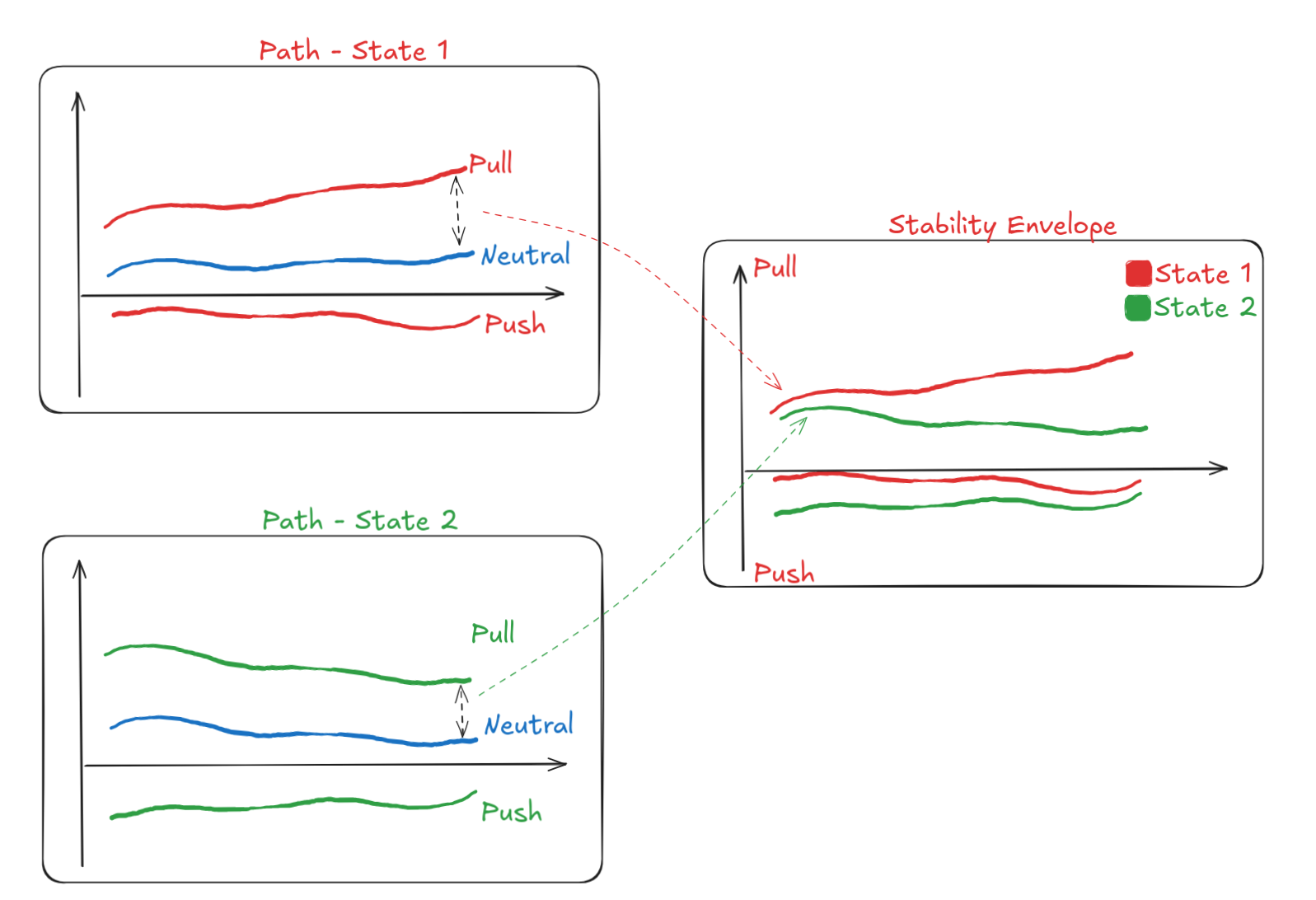
Let's start by modelling these ideas. Given an experiment, we want to be able to create a stability envelope and a path.
% Experiment.m
classdef Experiment
    methods
        % ...
        function envelope = create_stability_envelope(self, directions, other_arguments)
            % Some internal processing
            is_neutral = % ...
            neutral = self.Data(is_neutral);
            envelope = Envelope(self, directions, neutral)
        end
        function path = create_path(self)
            % Do any internal processing
            path = Path(self)
        end
    end
end
What goes in Experiment.create_stability_envelope() vs in Envelope class
Generally the constructor for an object should require the information ready for it to use, without having to know anything about internal details from other objects.
For example, if you want to create a cube from information provided by a square, ideally you don't have
my_square = Square(2);
my_cube = Cube(square)
my_cube = Cube(square.side)
Cube is entirely contained within that class, without knowing anything about Square.
That being said, sometimes there's a lot of data that you need to pass, and it makes sense to use the structured object.
Imagine, for example, passing a long list of configurations.
This is the case with the example, which is why we pass self, which contains all the data in a particular structure.
Convenience
In some cases there is enough complexity in creating objects that you might want some convenience functions. For example, an anterior-posterior (AP) envelope is extremely common, so providing the function that fills those arguments is helpful.
% Experiment.m
classdef Experiment
    methods
    % ...
        function create_ap_envelope(self)
            % Generate other arguments from default
            % other_arguments = ...
            self.create_stability_envelope(["ant", "pos"], other_arguments)
        end
    end
end
What this means is that if I'm using the typical usage of the code with the normal names for the data files, it becomes easier to read and more convenient. Usage goes from:
directions = ["ant", "pos"];
other_arguments = ...
my_experiment.create_stability_envelope(directions, other_arguments)
to
my_experiment.create_ap_envelope();
Creating an Envelope
The key is to think about how your data type is modelling the real-world concept.
An Envelope describes motion in two opposite directions (push--pull, anterior--posterior), so a logical choice would be to make Directions a property of the class.
The data are also stored as a property, together with states, specimen names, etc.
% Envelope.m
classdef Envelope
    properties
        Data
        Directions
        States
        %...
    end
    methods
        function self = Envelope(trajectory, directions, other_arguments)
            self.Directions = directions;
            % Some internal processing to determine specimens, which data refers to neutral, etc
            % specimens = ...
            % neutral = ...
            self.Data = subtract_neutral(specimens, neutral); % Heavy logic creating envelopes
            % ...
        end
    end
end
Changing data types
It's really important to notice that we are intentionally changing data types.
This allows us to clearly know when we're talking about experiments, paths or envelopes.
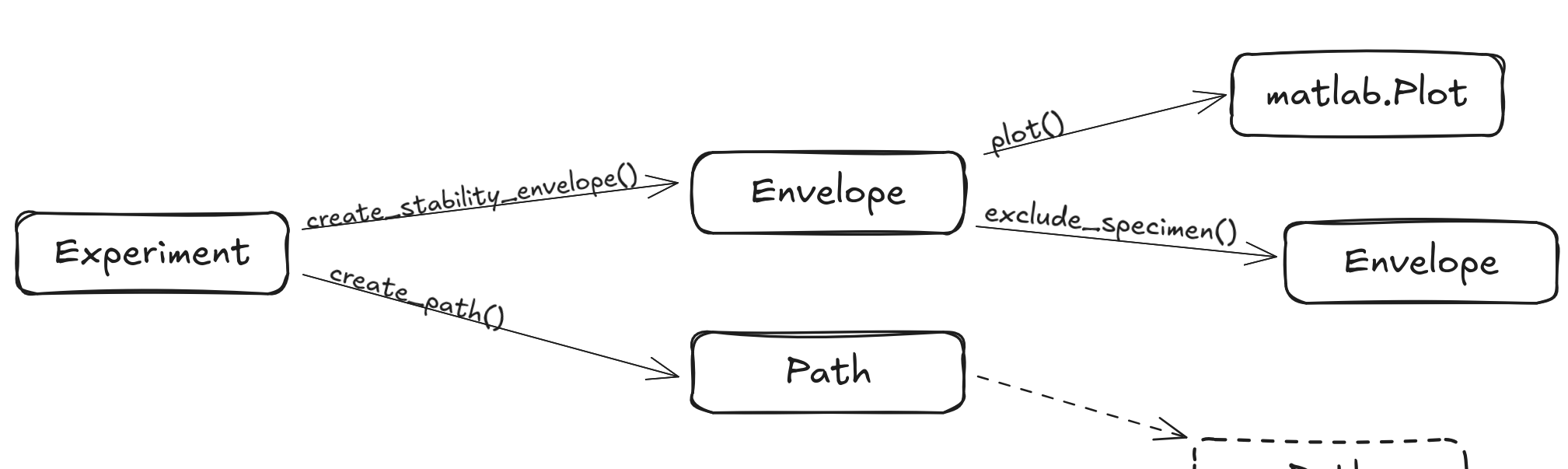
It also helps to have code that looks really similar, but have very distinct implementations.
Both lines of code produce graphs, but one produces Envelope graphs and the other, Plot graphs.
% (1)                  (2)                 (3)
my_experiment.create_stability_envelope().plot();

% (4)             (5)        (6)
my_experiment.create_path().plot();
ExperimentEnvelope- Envelope implementation of
plot() ExperimentPath- Path implementation of
plot()
An example using dogs instead
Imagine that a Dog might have a name, when it last visited the vet and a list of documents tied to their health records.
classdef Dog
    properties
        name
        last_vet_visit
        documents
    end
    methods
        function document = get_documents(self)
            document = self.documents
        end
        % etc
    end
end
We need enough justification for a document to be an actual class.
Maybe both Dogs and Cats have the same types of documents tied to them, and we want to tie functions to documents, so we create a class to represent this generic Document
classdef Document
    properties
        kind
        date_issued
        issuing_organ
        contents
    end
end
The important thing to notice is that calling get_documents() gives you a list of Document related to a specific Dog.
In a similar way that when we call create_ap_envelope() or create_stability_envelope() on an Experiment, we produce an Envelope.
Statistics
We can add more detail to the workflow and focus only on data processing and output.
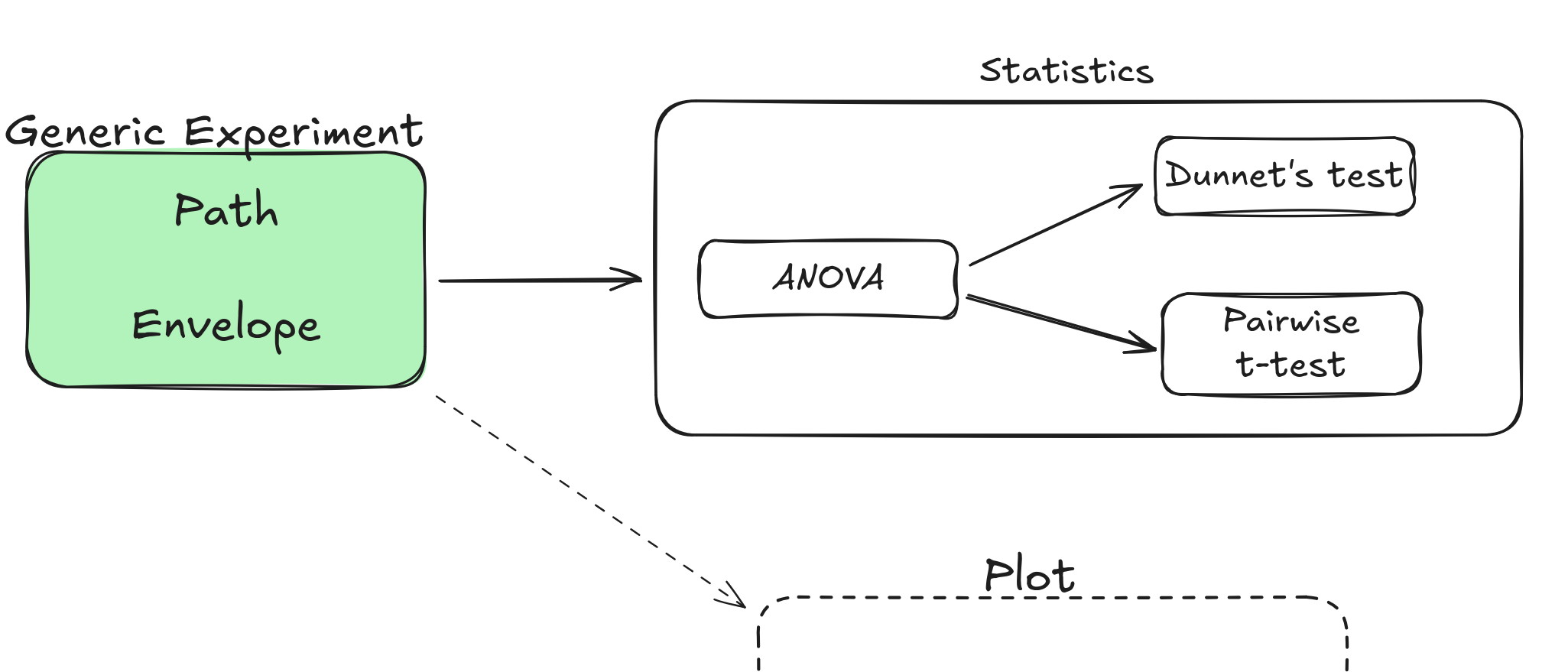
We gather data about how body parts move over time, which lends itself to the use of statistical parametric mapping (SPM). Our usual routine allows us to use a simpler, one-dimensional implementation of it, which define their own versions of ANOVA and post hoc analysis.
We apply the same principles discussed previously, namely changing data types in order to represent a different state of the data (1).
Envelope has a function calculate_spm() that applies SPM-based analysis to the data, instantiating the SPM class.
Performing the ANOVA and inference are all done within the constructor for SPM.
Most importantly, Envelope doesn't know any details about implementation of statistics -- it only knows how to call the statistics package.
EnvelopeandPathare tables with the same fields, but they represent two different ways the data has been processed; two different states of the data.
classdef Envelope
    methods
    % ...
        function stats = calculate_spm(self)
            data = self.Data;
            specimens = self.Specimens;
            directions = self.Directions;
            stats = SPM(data, specimens, directions);
        end
    end
end
classdef SPM
    properties
        Anova
        Inference
    end
    methods
        function self = SPM(data, specimens, directions)
            % Format the data as required by spm1d
            % Loop over directions, etc ...

            self.Anova.(direction) = spm1d.stats.anova1(data_formatted, states)
            self.Inference.(direction) = anova.inference(0.05);
        end
    end
end