
All in One View
Content from Why sustainable digital research matters
Last updated on 2026-07-23 | Edit this page
Overview
Questions
- What are the net zero goals and why are they important for addressing climate change?
- How does digital research contribute to greenhouse gas emissions, and what is the scale of this contribution?
- What is mindful computing and how can it be applied to reduce carbon emissions in research?
- Why is it important for researchers to consider the environmental impact of their digital activities?
Objectives
- Explain the context of net zero goals and the distinction between carbon neutral and net zero.
- Identify the main contributors to carbon emissions in digital research infrastructure.
- Describe the concept of mindful computing and its relevance to sustainable research practices.
- Justify why researchers have a responsibility to minimize carbon emissions from their digital activities.
Environmental sustainability
Environmental sustainability refers to the need for human activity to be balanced with the long term health of the planet and availability of natural resources. There are many issues that can impact environmental sustainability:
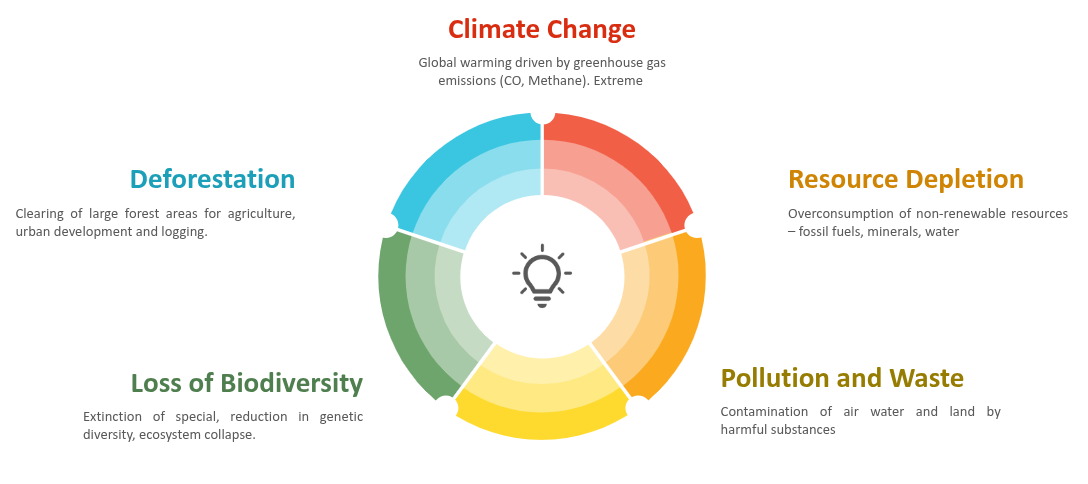
The most pressing sustainability challenge facing the world is the emission of greenhouse gases driving the climate emergency. For this reason we will primarily focus on greenhouse gas emissions, in particular we’ll focus on the metric Kilograms Carbon Dioxide Equivalent (kgCO₂e). This is a simplified metric that aims to represent the impact of a range of greenhouse gases as a single figure by expressing them as an equivalent emitted quantity of Carbon Dioxide (CO₂).
The context of net zero goals
Climate change and global warming have become pressing issues in recent years. A primary cause of these phenomena is the increase in greenhouse gas emissions in the atmosphere. Greenhouse gases (for example, carbon dioxide) are responsible for trapping heat in the Earth’s atmosphere, leading to rising global temperatures. These gases are emitted from various human activities, including the burning of fossil fuels, deforestation, and industrial processes.
To combat this, many countries, including the UK have set “net zero” goals. Net zero refers to the balance between the amount of greenhouse gases emitted and the amount removed from the atmosphere. The way to achieve net zero is by reducing emissions as much as possible and decarbonising activities. The UK plans to reach net zero by 2050.
Carbon neutral vs net zero

The terms carbon neutral and net zero are often used interchangeably, but they have different meanings. They both refer to removing harmful emissions from the atmosphere, but the kind of emissions removed and the scale are different.
Carbon neutral requires taking action to reduce carbon emissions and offsetting any remaining emissions, of a given activity. Offsetting is the process of compensating for carbon emissions by investing in projects that reduce emissions in an equivalent amount elsewhere. Usually organisations would first begin by reducing their carbon emissions as much as possible, and then offset the remaining emissions.
Net zero refers to the balance between the amount of all the greenhouse gases emitted and the amount removed from the atmosphere. Net zero uses offsets that truly absorb emissions e.g. tree planting, which is more robust as the net emissions can actually reach 0. Hence, achieving net zero has a much wider scope and requires going further than just reducing carbon emissions.
The role of digital research
Digital research is one of the contributors of greenhouse gas emissions and involves a wide range of activities that lead to these emissions, including:
- the use of software for data analysis, simulations and machine learning
- the storage of data
- the use of cloud computing resources
- the manufacture and provision of digital infrastructure (eg. computers, servers)
Providing these digital resources requires significant production of computer hardware and leads to significant electricity consumption, ultimately resulting in substantial carbon emissions.
The numbers in recent years show that ICT contributions to global carbon emissions were 1.3% in 2007, a revision from 2021 pointed to 4.1% and predictions for 2040 are reaching 14%.
---
config:
  xyChart:
    showDataLabel: true
---
xychart
  accTitle: {ICT contributions to global carbon emissions}
  accDescr: {1.3% in 2007, 4.1% in 2021 and predicted 14% in 2040}
  x-axis "Year" [2007, 2021, 2040]
  y-axis "ICT contributions to global carbon emissions (%)" 0 --> 15
  bar [1.3, 4.1, 14]
While digital research will always be a fraction of all of these emissions, the UKRI Net Zero DRI Scoping Project final technical report suggests a very challenging scenario in the years to come if carbon emissions are to be kept at bay with the growing demand for energy in digital-related activities in research. For the UKRI alone, the estimated carbon emissions of digital research are 75 kilotons of CO2e per year, with:
- 40 kilotons corresponding to large scale compute facilities
- 35 kilotons related to servers, laptops and small equipment.
Digital research is important for scientific progress and has the potential to contribute to solving many of the global challenges, including climate change. However, it is necessary to ensure that the carbon emissions associated with digital research are minimised. As we will learn in the following episodes, there is not a single, big carbon producer in digital research that we can eliminate without hindering the research activity, but a myriad small activities, practices, tools and processes that, while individually do not represent a big challenge, their sheer amount results in the above estimates.

As researchers, we have a responsibility to consider the environmental impact of our work and take steps to reduce it. This begins with mindful computing, a term which describes a more conscious approach to planning, running and managing digital tasks to ensure that scientific advances don’t produce more emissions than needed. Adopting this mindset could look different to everyone.
A few examples of what mindful computing could mean are:
- choosing a datacenter in a region powered by renewable energy can significantly reduce a project’s carbon footprint
- careful storage data management, where small steps such as deleting unused data or compressing data can reduce the carbon associated with long-term storage
- using incremental processing or requesting the right GPU/CPU resources when using High Performance Computing.
The purpose of this course is to explore how to measure and estimate the carbon emissions from digital research activities, what are the sources of these emissions, and what are some ways to reduce them.
References
- The UK’s plans and progress to reach net zero by 2050
- For a livable climate: Net-zero commitments must be backed by credible action
- It’s time to decarbonise digital research
- ICT currently contributes around 4.1% of global carbon emissions, with projections reaching 14% by 2040.
- Digital research in the UK alone generates an estimated 75 kilotons of CO₂e per year, split roughly equally between large-scale compute facilities and smaller devices.
- Net zero goes further than carbon neutral by targeting all greenhouse gases and requiring offsets that genuinely absorb emissions rather than merely compensating elsewhere.
- Mindful computing is a conscious approach to planning, running and managing digital tasks to ensure scientific progress does not produce more emissions than necessary.
- Researchers have a responsibility to consider the environmental impact of their digital activities and take steps to reduce them.
Content from Energy, power and carbon
Last updated on 2026-07-23 | Edit this page
Overview
Questions
- What is the difference between energy and power, and how are they measured?
- How does carbon intensity of electricity vary throughout the day and year, and what causes this variation?
- What is the difference between embodied carbon and operational carbon emissions?
- How does the Greenhouse Gas (GHG) Protocol categorize different types of emissions?
Objectives
- Calculate energy consumption and power usage using appropriate units.
- Explain how the energy mix affects grid carbon intensity and why renewable sources are prioritized when available.
- Distinguish between embodied and operational carbon emissions, and classify emissions using the GHG Protocol’s three scopes.
- Apply the concept of demand shifting to reduce carbon emissions by timing computational work during low carbon intensity periods.
Energy and power
Energy is a physical property that can be used to do work. This can be lifting a weight, pushing a piston or even running a computation on a computer. The SI unit of energy is the Joule (J) but commonly the kilowatt-hour (kWh) is also used when expressing electrical energy use.
Power is a rate at which energy is drawn i.e., how much energy is used in a given amount of time. The SI unit of power is the watt (W) however kilowatts (kW) are commonly used as well.
Joules, kilowatts and kilowatt-hours
The units used for power and energy can be confusing, particularly kilowatt-hours as a unit of energy. A useful relation to bear in mind is that \(1 W = 1 J/s\). By multiplying watts by another unit of time we recover units of energy with a scaling factor.
Kilowatt-hours are commonly used because they tend to work out nicely for everyday situations, e.g. a kettle may have a power rating of 1 kW so running it for an hour gives 1 kWh of electrical energy used.
Practising units of power and energy
Which of the below are not equal to 1 kWh.
- A - 200 W drawn for 12 minutes.
- B - 1000 J
- C - 3,600,000 J
- D - 5000 W drawn for 12 minutes.
- A - 0.2 kW x 0.2 hours = 0.04 kWh
- B - 1000 J = 0.00027 kWh
- C - 3,600,000 J = 1 kWh
- D - 5 kW x 0.2 hours = 1 kWh
Energy sources and carbon emissions
Energy famously cannot be created or destroyed but the electrical energy used for research activities has to come from somewhere. In practice the majority of electrical energy used for digital research comes from a national electricity grid so this will be our focus.
The electrical grid serves to transport electrical energy from electricity generators to end users. Economies of scale tend to mean that electricity generation is a large scale activity. The electrical energy supplied to the grid comes from a variety of different sources. This can be fossil fuels like coal and gas or green energy sources like solar and wind.
A key feature of electrical grids is that supply must be balanced with demand. Demand for electricity can vary greatly throughout a year or even an individual day. The grid responds to increases in demand by purchasing additional electricity from suppliers.
Energy Mix and Carbon Intensity
Different methods of electricity generation have different properties. Some of the important include:
- Cost - The cost of generating each kWh of energy.
- Carbon Intensity - A measure of the kgCO₂e emitted per kWh of energy.
- Dispatchability - How easily or quickly generation can be scaled up in response to demand.
- Predictability - How easy it is to predict the amount of generation available.
The table below provides a quick summary of how different energy sources compare on their key properties:
| Energy source | Cost | Carbon intensity | Dispatchability | Predictability |
|---|---|---|---|---|
| Gas | Medium | Medium | High | High |
| Solar | Low | Low | Low | Low |
| Wind | Low | Low | Low | Low |
| Nuclear | High | Low | Medium | High |
| Hydro | Variable | Low | Variable | High |
While solar and wind are very good in terms of cost and carbon intensity, they are unable to respond effectively to changes to demand. Gas, and to some extent, nuclear, while less appealing otherwise, can respond to these quick changes and hence complement green sources.
The energy sources used by the grid will change on an hourly timescale and some sources such as wind and solar can be subject to seasonal and climate effects. The relative cost of different sources can also be impacted by global events and markets. The sources of electricity used by the grid are referred to as the energy mix. The energy mix of the grid leads to an overall carbon intensity value given as gCO₂/kWh of electricity generated. This can also be broken down by geographical region or given as an average for a time period.
Green Energy Costs
A key aspect to note is that renewable sources of electricity generation are usually the cheapest option so the electricity grid will always try to minimise costs by using renewable sources where possible. This shows that if we can shape our demand for electricity to times where more renewable energy is available we both reduce emissions and provide an economic drive for more investment in renewable sources and less investment in sources of electricity generation based on fossil fuels.
Carbon Intensity in the UK
The following graphs show a typical UK day in 2026.
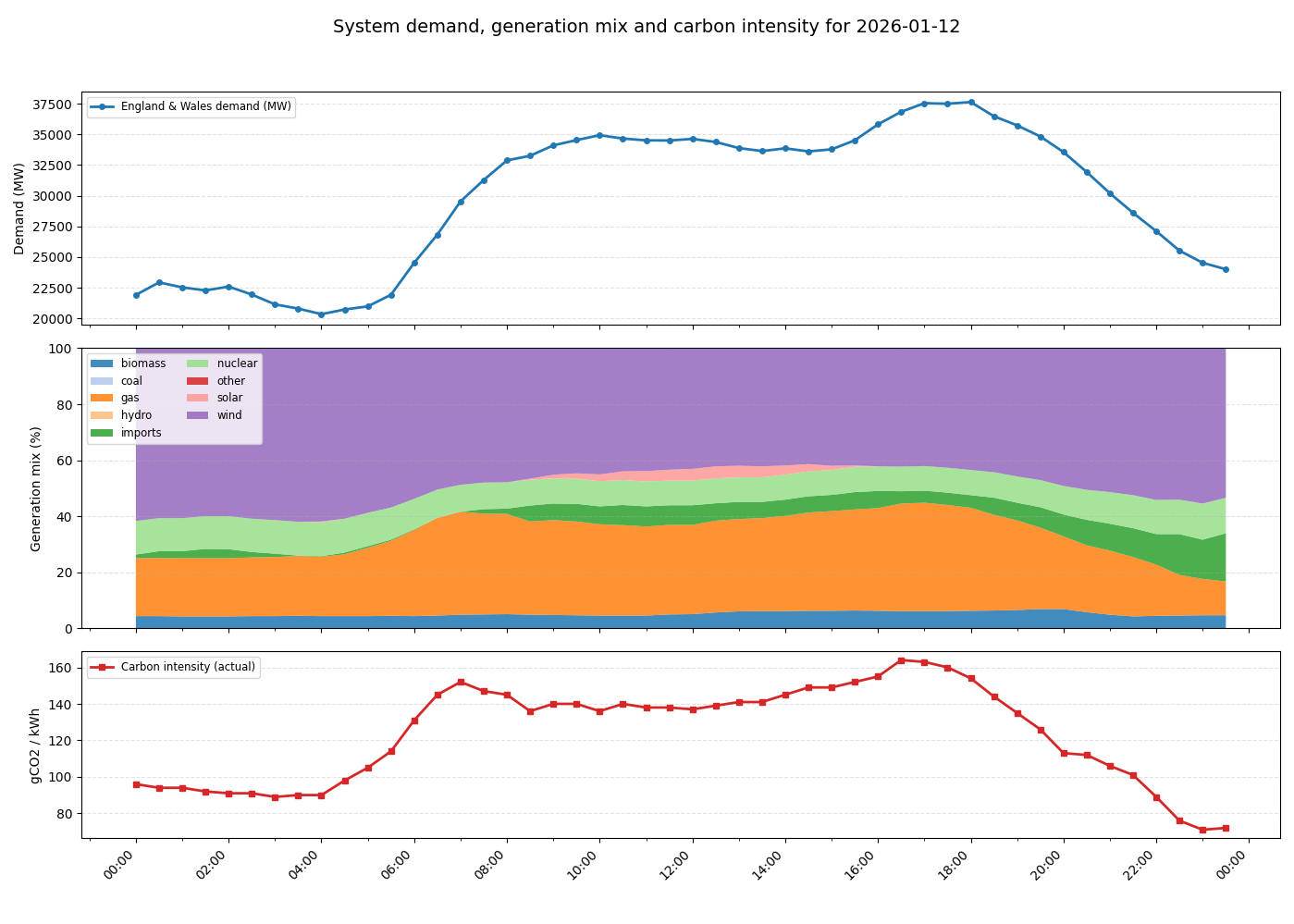
The following dynamics are at play:
- At midnight initial energy demand and carbon intensity is low.
- Around 5am, energy usage begins to increase as people wake up and businesses open. As demand increases, the proportion of gas in the energy mix increases as more gas generation is brought online to keep the grid balanced. This also drives an increase in carbon intensity.
- Carbon intensity peaks in the morning around 7am. Although energy demand continues to rise, gas usage and carbon intensity drop slightly as cheaper imported energy becomes available. Slightly later a small amount of solar power also becomes available as the sun rises.
- Demand remains steady throughout the day before increasing in the evening. This is driven by domestic usage as people come home, cook and use domestic appliances. Again additional gas generation is brought online to meet the demand and carbon intensity rises to its peak value.
- As the evening progresses and people go to bed, demand drops again and carbon intensity also falls as gas generation goes offline. Overall carbon intensity ends up lower at the end of the day than the beginning as more imported energy is available.
Real-time Carbon Intensity
- On your laptop or your phone, open https://carbonintensity.org.uk/
- Look at the current carbon intensity for our region right now. Which energy source do you think is currently marginal (‘filling the gap’ to meet demand)?
The marginal source is the most expensive source needed to meet demand. On days with lower intensity the marginal power source is usually the one with the highest dispatchability. For example, renewables are almost always used first, while nuclear energy could be more difficult to turn off. In contrast, gas is expensive but has high dispatchability.
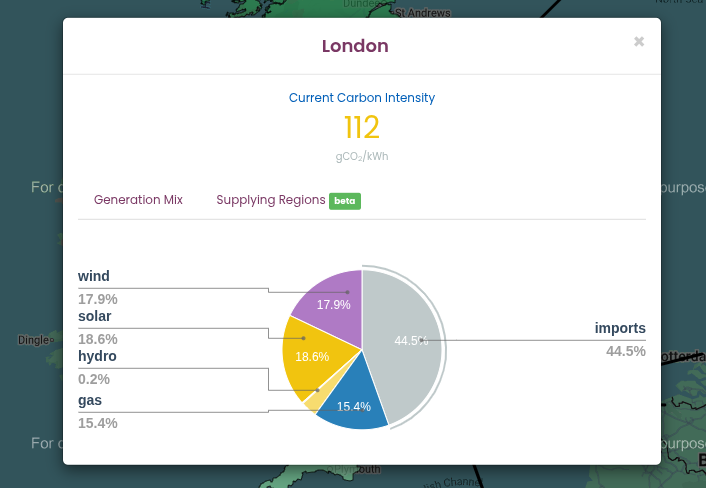
Looking at the Generation Mix in the pie chart obtained from https://carbonintensity.org.uk/ on a sunny day in London:
- Wind (17.9%) and Solar (18.6%): These have very low variable costs. If it is windy or sunny, the grid uses all of this energy this energy first.
- Imports (44.5%): These are usually scheduled in advance based on international contracts. While they can be marginal, they can’t be as easily switched on and off.
- Gas (15.4%): High dispatchability, and can be ‘increased’ if the grid needs an immediate increase in supply.
Takeaways
The pattern shown is typical for a day in the UK. There are however many other factors that can determine the relationship between demand and carbon intensity which can play out at a variety of timescales.
There is considerable variability in the carbon intensity of electricity throughout the day - a factor of two in the above example. A simple strategy to reduce the emissions from digital research is therefore to shift electricity usage to times when carbon intensity is low. This is known as demand shifting. A simple rule of thumb is to favour running computationally intensive work at night.
Gas is a key part of the UK’s energy mix because of it’s dispatchability i.e., it’s ability to rapidly respond to changes in demand. Some green technologies like solar and wind have low dispatchability as they depend on factors like the weather.
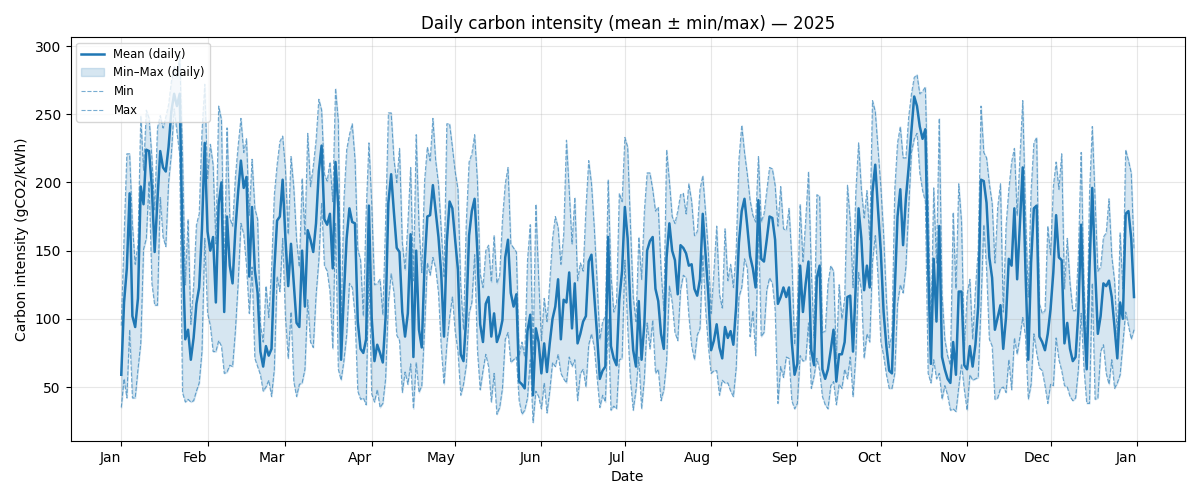
The above graph demonstrates how carbon intensity can vary throughout the year in the UK. For the UK season is not a strong driver of carbon intensity. It is interesting to observe that the minimum and maximum carbon intensity of the grid can vary between ~50 gCO₂/kWh and ~250 gCO₂/kWh, a factor of five.
Carbon Intensity Forecasts
For the UK there are publicly available forecasts for the carbon intensity available at https://carbonintensity.org.uk.
Data sources
The above graphs were generated from publicly available data provided by the National Energy System Operator. Data was sourced from the UK Carbon Intensity API and the NESO Data Portal. The scripts used to generate the graphs available on GitHub in ImperialCollegeLondon/digital_research_sustainability_visualisations.
Embodied carbon and carbon awareness
So far we’ve focussed on the relationship between carbon emissions and electricity usage. This is relevant to the operation of equipment used in digital research and is usually the dominant component of the operational carbon. Another key source to consider however are embodied emissions.
Embodied carbon is the greenhouse gas emissions produced during the full lifecycle of a product or system before it starts being used: raw material extraction, manufacturing, transport, construction and eventual disposal or recycling. It represents the “upfront” carbon locked into goods and infrastructure. Accounting for embodied carbon helps teams choose lower‑carbon options by considering repair, reuse, material choices and service life in addition to operational energy use.
We’ll discuss in detail the embodied carbon contributions associated with digital research activities in the next episode.
The Greenhouse Gas (GHG) Protocol and how to use it
So far we’ve discussed several sources of emissions. A key requirement to managing and reducing emissions is to measure and account for them. The Greenhouse Gas Protocol provides a framework for identifying and categorising different emission sources. It’s holistic and covers both direct and indirect emission sources.
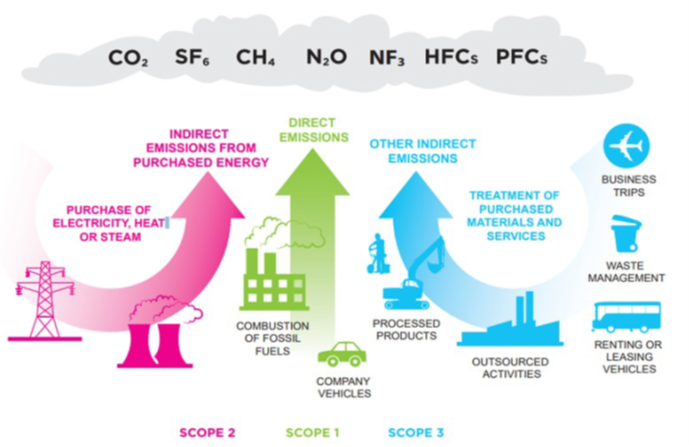
The GHG protocol breaks down emissions into three categories called scopes:
Scope 1 are direct emissions. These come from activities that directly emit carbon such as burning fuel. This would cover fuel used in a vehicle or an on-site heating system or electricity generation.
Scope 2 are indirect emissions. These come activities that draw energy produced elsewhere. This is primarily the emissions associated with electricity generation covered in detail above.
Scope 3 are “Value chain emissions”. These come from everything upstream i.e., requirements you need to carry out research activities and everything downstream i.e., emissions associated with the use of your research outputs, even by others. Upstream emissions includes things like the embodied emissions of hardware whilst downstream emissions might include use of software or data you’ve created.
The GHG protocol is most often applied to businesses, countries or cities but it can be applied at any scale including an individual or research group. It’s easy to get hung up on which scope to place emissions in but perhaps the key takeaway is to take a broad view of different emissions sources.
Emission types
Based on the GHG Protocol, categorise each of the following activities as Scope 1, Scope 2, or Scope 3.
- Powering your laptop
- Running simulations on a cloud provider
- A return flight to a conference in New York
- University-owned car that transports equipment
- Recycling an old laptop
- Leaking Ultra-low temperature (ULT) freezer
| Activity | Scope | Justification |
|---|---|---|
| 1. Powering your laptop | Scope 2 | Indirect emissions from energy purchased and used by the lab |
| 2. Running simulations on a cloud provider | Scope 3 | You are using a service but don’t own the servers |
| 3. Conference travel | Scope 3 | The airline owns the plane |
| 4. University-owned car | Scope 1 | Direct emissions by the institution |
| 5. Recycling an old laptop | Scope 3 | Downstream emissions from the laptop’s end-of-life |
| 6. Leaking Ultra-low temperature (ULT) freezer | Scope 1 | Direct emissions from leakage of equipment owned by the lab |
Carbon in Context
While digital emissions might seem small, their impacts are cumulative. To provide a clearer picture of these impacts, the following table contextualizes digital emissions against common research-related activities, such as international travel and laboratory-related activities. Thinking about digital emissions in the context of the wider usual research activities gives a better idea of what is driving carbon footprint, making it easier to see where one can make the most impactful changes.
| Activity / Item | Carbon Impact (kgCO2e) | Comparison | % of per-capita UK emissions |
|---|---|---|---|
| Running a Fume Hood (1 yr) | ~4,700 | 2.35x Return Flights (LHR-JFK) | 112% |
| Ultra-low Freezer (1 yr) | ~1,200 | Storing 10TB of data on SSD for ~3 years | 28.7% |
| Long-haul Return Flight (LHR-JFK) | 2,000 | Energy for 1 average household | 47% |
| SSD Storage (10 TB / 1 yr) | 360 | Purchasing two new laptops in a year | 8.5% |
| New Laptop (Manufacturing) | 160 | 77.6% of the carbon emissions from a 4 year lifecycle of the same laptop | 3.8% |
| Laptop Lifecycle (4 yrs) | 206 | Replacing laptop every 4 years | 4.9% |
Data assumptions and calculations:
- 4.22 tCO2e emissions per-capita in UK according to the International Energy Association
- Grid intensity: 0.136 kgCO₂/kW as the average intensity grid in England in February 20261
- Long-haul flight emission: based on a return flight in Economy class from London Heathrow to New York JFK, according to MyClimate calculator tool
- Fume Hoods: Based on an electrity consumption of 34,871 kWh/year 2
- Ultra-low Freezer: Based on a energy consumption of up to 25 kWh/day (8,900 kWh/year) of traditional cascade refrigeration systems 3.
- Household energy consumption: based on Ofgem estimate of typical household consumption in England of 2,700 kWh of electricity and 11,500 kWh of gas in a year, resulting in ~1900 kgCO2e
- SSD storage: Based on the higher end of estimated carbon emissions per TB/year 4
- New laptop: Based on the embedded emissions of a typical office laptop. It does not include operational emissions.
- Laptop Lifecycle: Based on the embedded and operational emissions of a typical office laptop.
References:
- National Energy System Operator
- Mills, E. & Sartor, D. Energy use and savings potential for laboratory fume hoods. Energy 30, 1859–1864 (2005). https://doi.org/10.1016/j.energy.2004.11.008 [Green software practitioner course]: https://learn.greensoftware.foundation/
- Kypraiou C, Varzakas T. Evolution and Evaluation of Ultra-Low Temperature Freezers: A Comprehensive Literature Review. Foods. 2025 Jun 28;14(13):2298. doi: 10.3390/foods14132298. PMID: 40647050; PMCID: PMC12248920.
- Swamit Tannu and Prashant J. Nair. 2023. The Dirty Secret of SSDs: Embodied Carbon. SIGENERGY Energy Inform. Rev. 3, 3 (October 2023), 4–9
- Carbon intensity of electricity varies throughout the day and across the year depending on the energy mix, which is driven by demand, weather, and fuel costs.
- Demand shifting — scheduling computationally intensive work during periods of low carbon intensity — is a practical strategy to reduce operational emissions.
- Embodied carbon covers emissions from the full lifecycle of a product including manufacture, transport, and disposal, not just operational electricity use.
- The GHG Protocol categorises emissions into Scope 1 (direct), Scope 2 (purchased energy), and Scope 3 (value chain), providing a framework for comprehensive accounting.
- Taking a broad view across all three scopes avoids underestimating the true carbon footprint of digital research activities.
Content from Digital research activities with sustainability issues
Last updated on 2026-07-29 | Edit this page
Overview
Questions
- What are the main sources of carbon emissions from computers, storage devices, and data centres?
- How do embodied and operational emissions compare for different types of hardware and storage technologies?
- What factors influence whether data centre computing is more or less carbon intensive than local computing?
- How can research data management practices and computational services contribute to carbon emissions?
Objectives
- Analyze the trade-offs between embodied and operational emissions for different computing and storage technologies.
- Calculate carbon emissions from personal devices and research workflows using appropriate tools.
- Evaluate the carbon efficiency of different research infrastructure choices, including local versus cloud computing and various storage strategies.
- Identify strategies to reduce emissions from research activities, including code optimization, data management plans, and carbon-aware computing.
Digital Research Infrastructure
Modern digital research depends on infrastructure ranging from individual computers and devices up to the globe spanning network of the internet. In this section we’ll look at some of the different components of digital infrastructure and their relation to carbon emissions.

Computers

Computers draw electricity during use and also produce considerable embodied emissions from production and transportation. Both embodied and operational emissions play a significant role in the carbon footprint of computing devices, but how to estimate them and reduce them is very different.
Embodied emissions
Embodied carbon emissions do not change once the machine is in your hands: they only depend on the manufacturing and transport process. However, embodied carbon emissions per year are reduced the more years the machine is in use. Hence, the longer the lifetime of the machine, the lower their embodied carbon footprint per year.
Before replacing a computer, make sure that it is really needed and that it is no longer fit for purpose.
- Can you replace just some parts to extend its lifetime, eg. memory, GPUs?
- Can you give it another useful purpose?
- Can you donate it to charity (eg. see options in the Device Donation Scheme) to extend its useful life instead of trashing it (or recycling it)?

Operational emissions
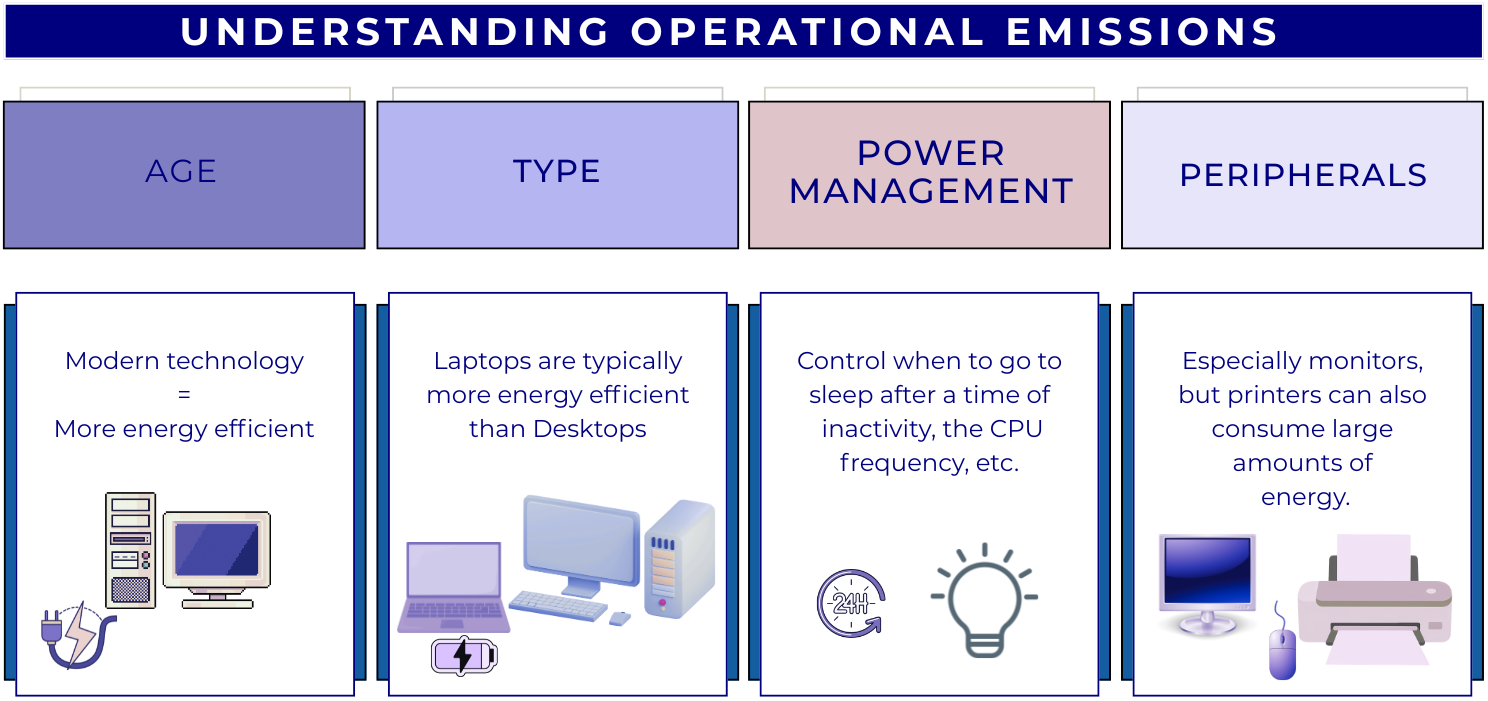
The operational emissions of a device depend on its design and performance, but also on how, when and where it is used. For this reason, it is useful to consider energy usage as a proxy for carbon emissions.
The power consumption of digital devices can be split into:
idle consumption: this accounts for the energy required when the device is powered but not carrying out any particular operation.
usage-based consumption: the energy consumed to perform a specific task. As computational workload increases, components like CPUs and GPUs, and memory draw higher levels of power, which may require energy systems to work harder to cool the system.
Utilisation, Utilisation, Utilisation
Following from the above, sustainability in computing means having the minimum amount of hardware, fully utilised doing useful work. This ensures the “fixed” overheads of idle power and embodied emissions are minimised per unit of useful computational work.
Operational vs Embedded Emissions
As a rule of thumb, for consumer electronic devices (that is laptops, desktops, tablets and phones) the embodied emissions are far in excess of operational ones. This emphasises the importance of maximising the lifetime of these devices.
For enterprise servers that have a much greater maximum operational power draw, the balance can vary with factors like local carbon intensity and utilisation. As the carbon intensity of electricity is expected to fall over time however, embodied emissions will increasingly dominate.
Estimating and Measuring Computer Emissions
Embodied Emissions
Finding the embodied emissions of a device relies on information provided by the manufacturer. The regulatory environment is evolving; however, increasingly, there are legal requirements for manufacturers to publish Product Carbon Footprint (PCF) data for their products. Information can be easily found by searching the internet for “PCF” and the manufacturer’s name.
We’ll see some example PCF sheets below. However, it’s important to note that different manufacturers can use different methodologies and assumptions. This means it is not advised to directly compare PCF data between manufacturers.
Here is the HP EliteBook 840 G9 PCF Report:
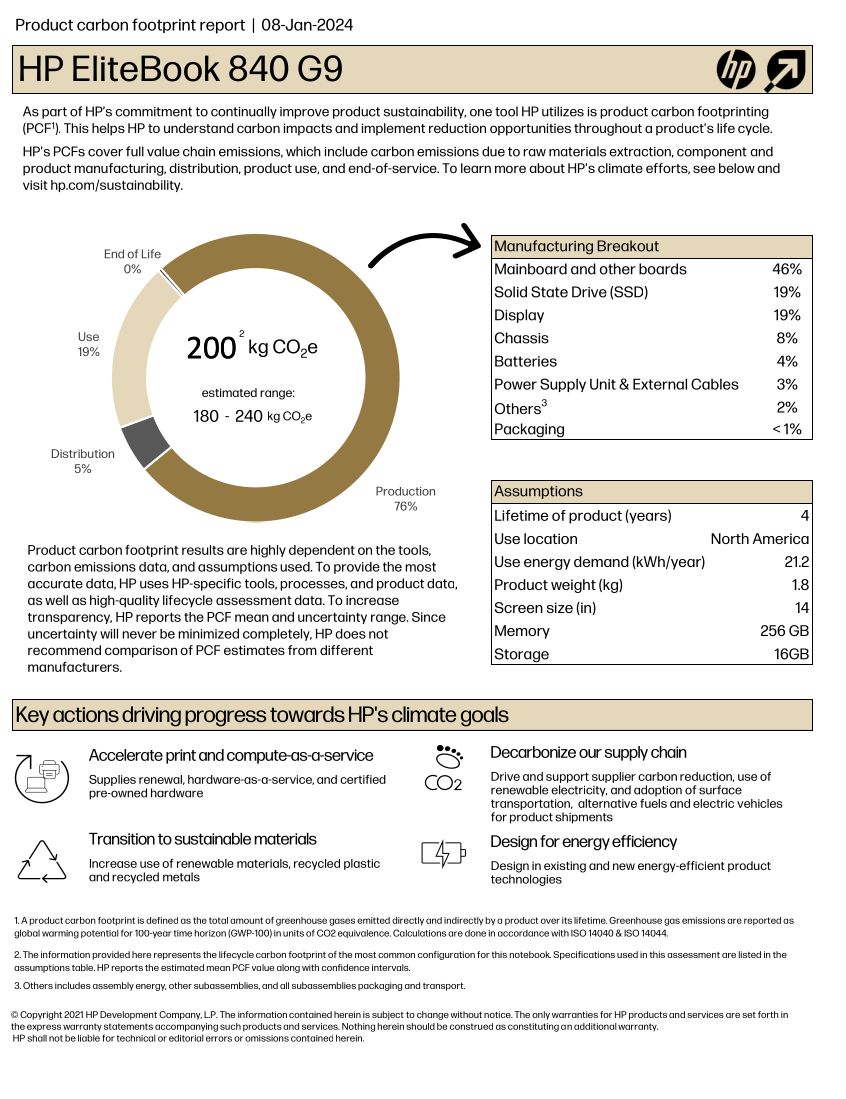
If we exclude the Use section of the chart, the
remaining, related to production and transportation, accounts for about
~80% of the estimated total, i.e. 160 kgCO₂e.
What are the embodied carbon emissions of your computer?
Find the model of the computer you are using right now to do this course and try to find out its embodied carbon emissions.
- Which part produces a larger carbon footprint?
- If it is a laptop and the battery is failing, how much carbon could you save if you just replace the battery for a new one instead of replacing the whole laptop?
Operational Emissions
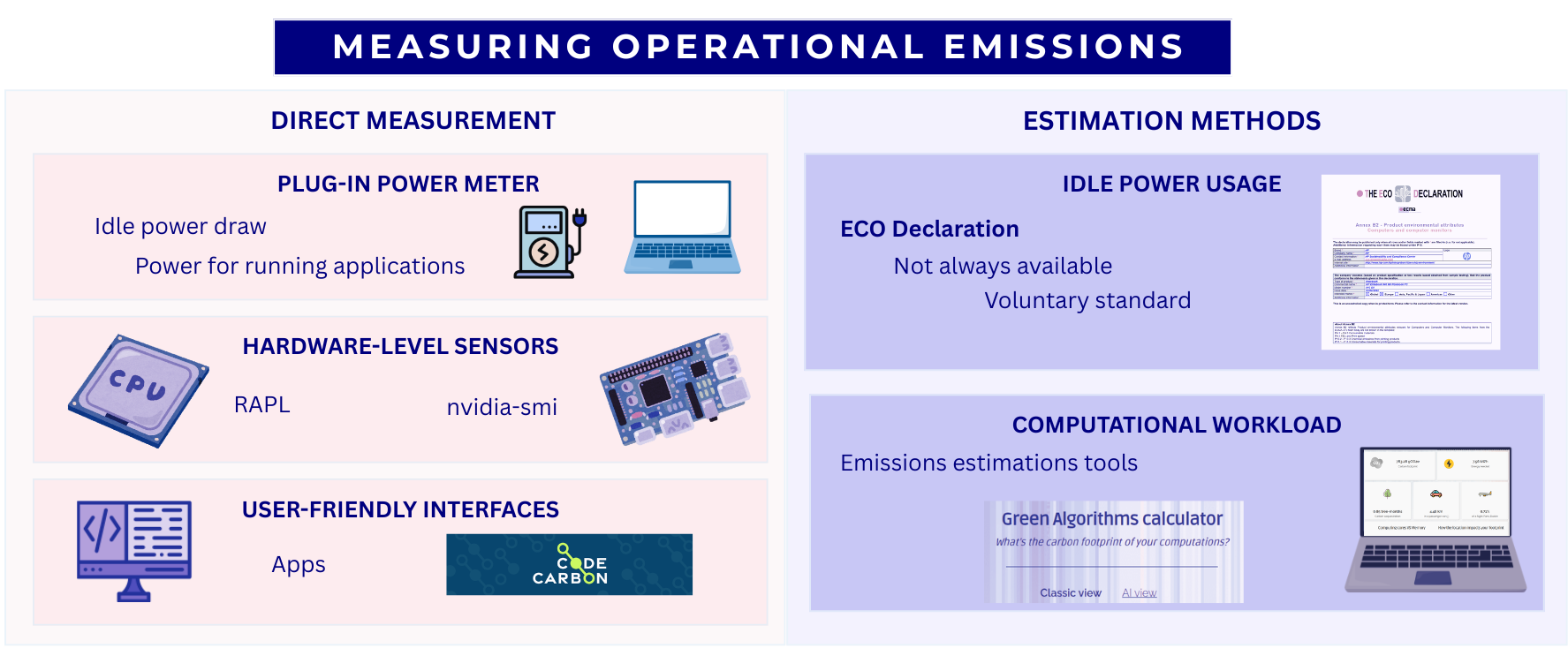
Power draw can be measured via:
- Plug-in power meter. There are many models, but most will provide both the instantaneous power and the energy used over a period of time. The obvious requirement however is physical access to the power source.
-
Hardware counters. Modern hardware often supports
reporting the power usage of individual components. This varies based on
the hardware but two common examples are RAPL (Running Average Power
Limit) for CPUs and
nvidia-smiNVIDIA GPUs. - CodeCarbon. A Python application providing a more user friendly interface for hardware counters.
If it is impractical to make any direct measurements, there are also some methods to estimate power draw:
- ECO Declaration. Provides manufacturer information about idle power usage. For example, the ECO declaration of the HP EliteBook 840 G9 indicates an idle energy consumption of 22.67 kWh/year. This declaration also includes useful information about the product, like which components can be replaced or upgrade. The ECO Declaration is a voluntary standard so not all manufacturers provide it or it may contain incomplete information.
- Green Algorithms Calculator. A simple model that combines information about the resource utilisation of a computational workload with details of the hardware it ran on.
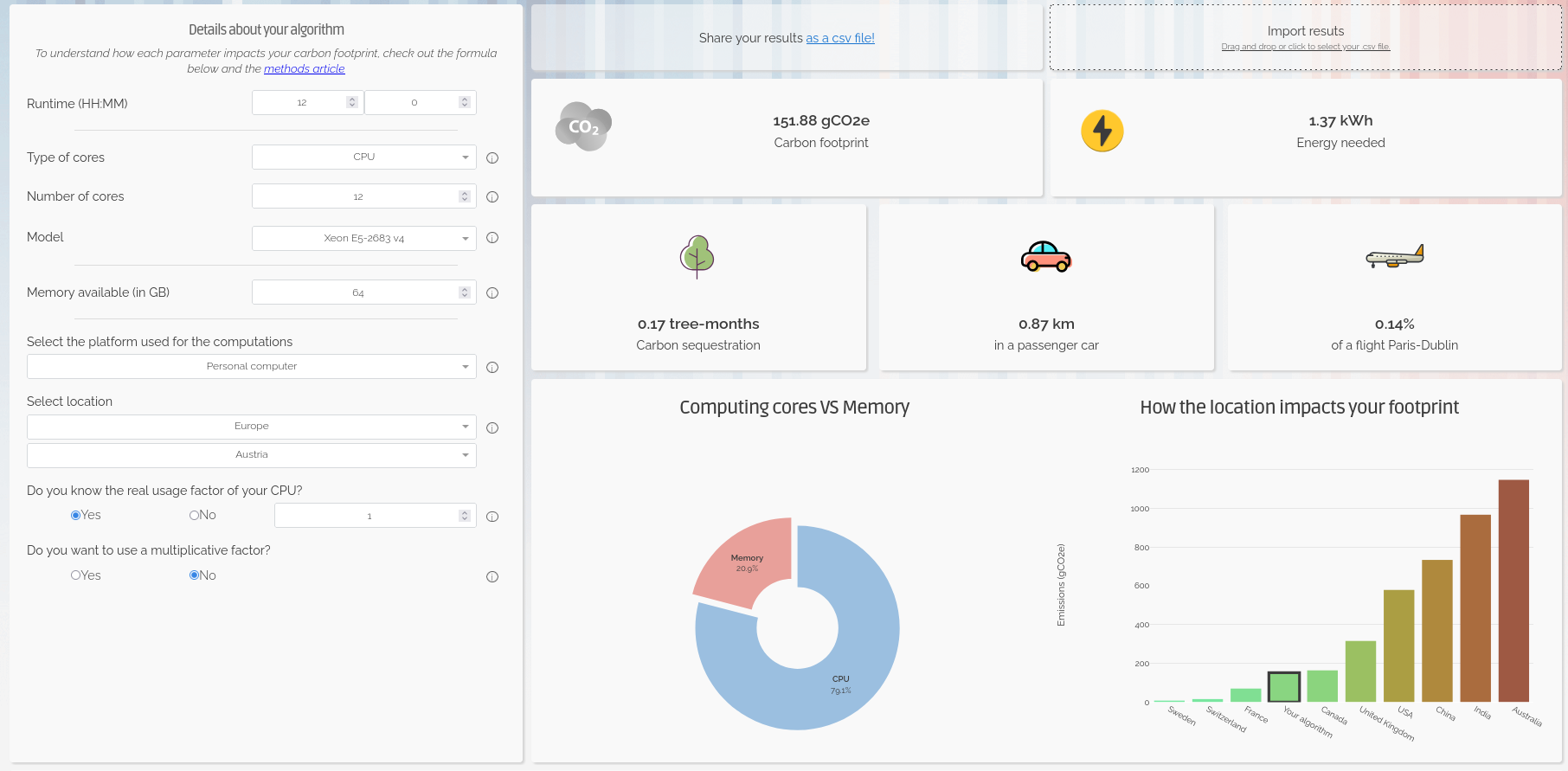
Trying Out the Green Algorithms Calculator
Open the Green Algorithms Calculator and try to calculate the energy usage and carbon emissions of your computer running a task on 1 CPU-core for 12 hours.
Storage Devices
Research datasets are increasingly large and replicated across multiple systems for reliability. As modern research practices move toward open data and long-term storage, the embodied and operational emissions of storage becomes a significant component of digital research’s environmental impact.
There are a few different storage mediums in common use:
- Solid-State Disk Drives (SSD): They use flash memory with no moving parts to store data, much like SD cards and USB drives, but with much larger capacity. Their embodied carbon emissions are high due to the rare metals needed for semiconductor manufacturing, while operational emissions are somewhat lower than for spinning disks.
- Hard Disk Drives (HDD): They store data on spinning magnetic disks. Embodied emissions are lower than those of SSDs but operational emissions are higher because their disks must spin continuously.
- Linear Tape-Open (LTO Tape): Magnetic tape technology used for long-term storage. Their embodied emissions are low, while their operational emissions are near zero.
Measuring and Estimating Data Storage Emissions
Similarly to computers, their associated carbon emissions can be split into operational and embedded components. Storage devices are often components of larger systems which can make it difficult to directly measure their power usage. Whilst some manufacturers do report sustainability data this is highly variable. In some cases storage device data may be included as a component of the PCF data for a complete system.
Given the general paucity of data, there have been some studies that attempt to estimate emissions from different storage media. We’ve summarised some useful estimates below:
| Category | SSD | HDD | LTO tape |
|---|---|---|---|
| Embodied Carbon | High (16-32 kg)1 | Moderate (2-4 kg)1 | Low (~0.07 kg)3 |
| Operational Carbon | Low (2-5 kg)1 | Moderate - High (2-16 kg)1,2 | Low (~0 kg) |
| Lifespan | 5–10 years | 5-10 years | 30+ years |
* Emissions are in kgCO₂e per TB per year
While the numbers vary depending on manufacturers and reporting available, it is generally considered that SSDs have a higher carbon debt per unit of storage than HDDs4. However, recent data suggests that the difference for enterprise-grade drives is shrinking, and new SSDs have only 2x the embodied carbon of comparable HDDs5.
SSDs allow data to be accessed almost instantly and are typically 10–100× faster than HDDs. LTO tapes offer the slowest access speeds, but they remain the preferred option for storing cold data due to their low cost, low embodied emissions and great energy efficiency.
Data Centres
Beyond personal computing devices like laptops and PC’s, much computing infrastructure is now accessed remotely. In this case, the computers are generally hosted in a data centre, a large industrial facility that can contain thousands of servers and the supporting infrastructure required to allow remote access.
The carbon emissions associated with the computers and storage devices in a data centre are covered above. As purpose built facilities, data centres can host more specialised equipment and benefit from economies of scale. They also have additional emissions sources beyond the individual servers they house.
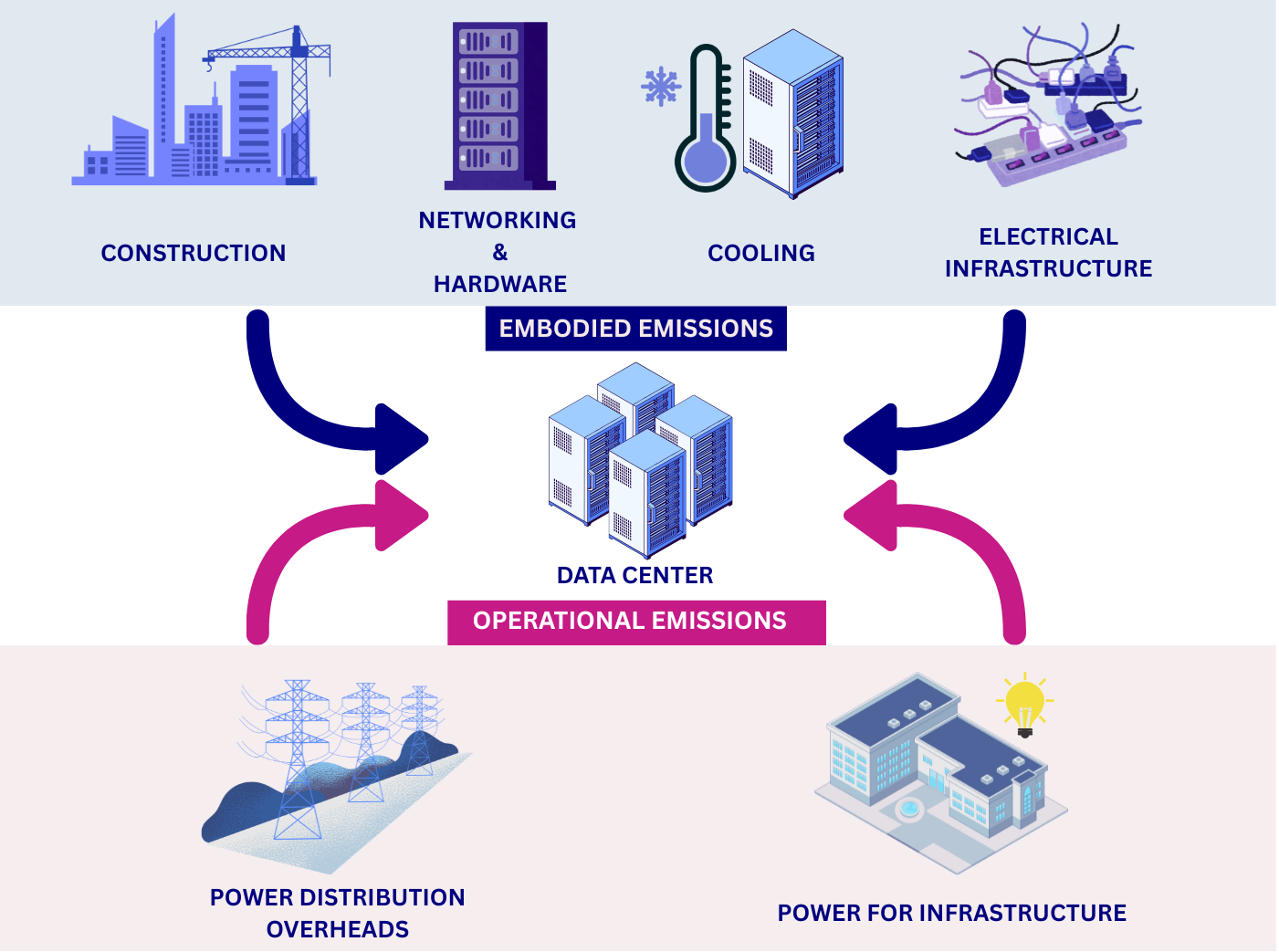
Data centre embodied emissions:
- data-centre construction: includes the concrete, steel, electrical infrastructure, etc.
- networking and supporting hardware: as the servers in a data centre are accessed remotely they must be serviced by network infrastructure such as switches and cables.
- cooling: the density of compute in data centres means they must have dedicated infrastructure for cooling. More information on this topic, in particular the water usage, is discussed below.
- electrical infrastructure: the high power demands of data centres can require construction of additional electrical infrastructure in the local area to support connection to the grid.
There are additional sources of operational emissions as well:
- power for infrastructure: this includes the networking infrastructure, cooling systems, lighting, etc.
- power distribution overheads: data centers deal with large amounts of electrical and encounter overheads in its distribution and transformation.
The energy efficiency of data centres is usually measured as their Power Usage Effectiveness (PUE), and determines how much of the energy entering the data centre reaches the IT equipment used for servers and storage compared to the energy used for other purposes like cooling.
\[ \mathbf{PUE} = \frac{\text{Total Facility Power}}{\text{IT Equipment Power}} \]
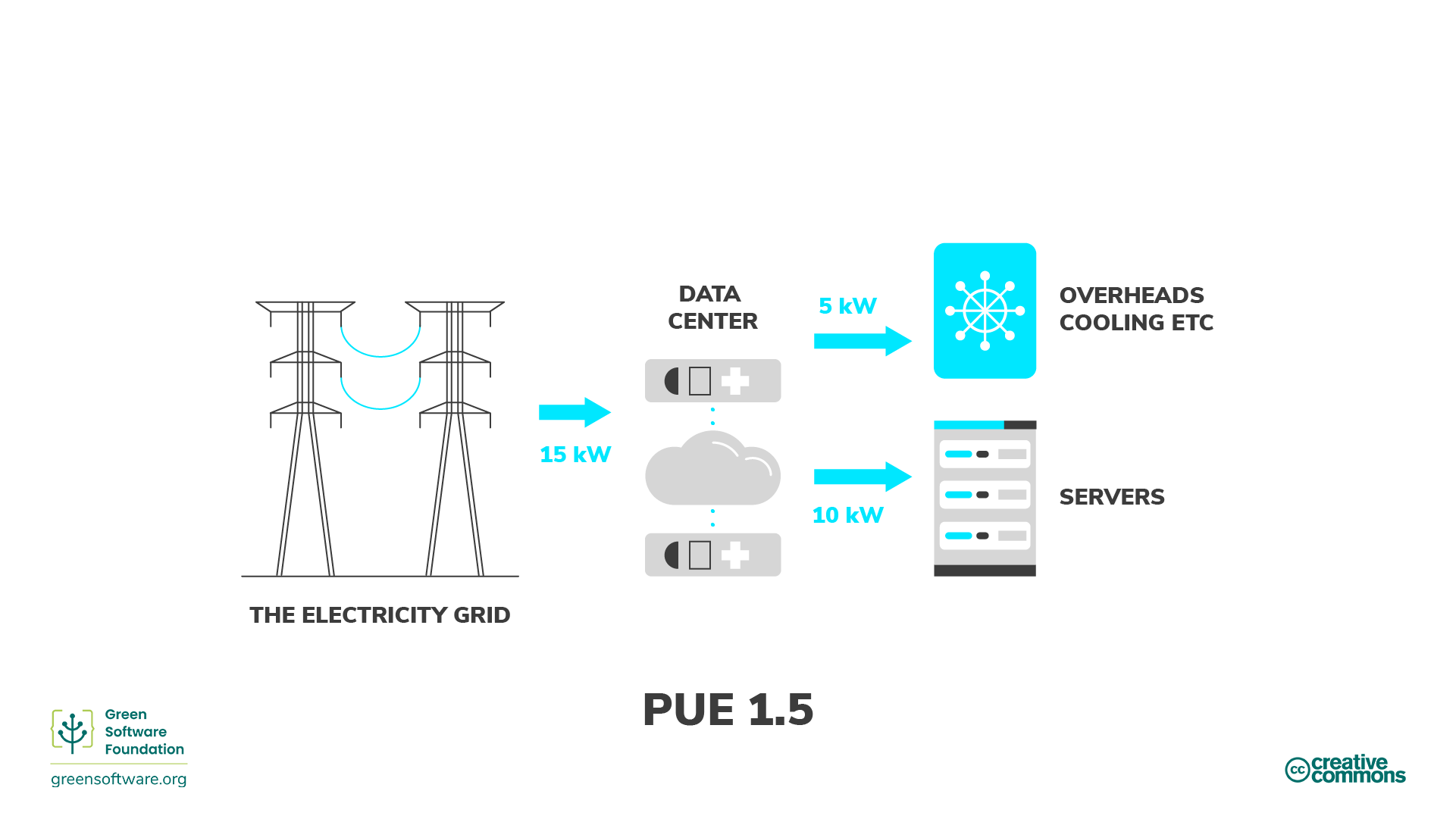
An average data centre has a PUE of around 1.59, meaning that for every 1 watt used to power computational resources, an additional 0.59 watts is spent on cooling and power distribution. Newer and larger data centres tend to be more efficient11, with a global average PUE of 1.41 in 202511.
The operational emissions of data centers depends heavily on the grid carbon intensity, with lower emissions in renewable-powered regions and higher emissions in fossil-fuel-dominated regions.
Despite the additional emissions sources, data centres have the ability to be far more energy efficient than the equivalent collection of individual computers or storage devices. This is due to their scale and specialisation and the provision of infrastructure that can be shared between many users.
| Category | Data Center | Local Equipment |
|---|---|---|
| Embodied Carbon | Lower (shared + efficient infrastructure) | Higher (duplication + under‑used hardware) |
| Operational Carbon | Usually lower (efficient cooling) | Usually higher (older facilities + local grid) |
| Energy Efficiency | High (fewer idle disks) | Generally lower |
| Utilisation | High (resources shared across many users) | Lower (over‑provisioning) |
Data centres and water usage
While this course focuses on the carbon emissions via the electricity usage, there is another big environmental factor associated to the running of data centres: water.
Water in data centres is used in huge amounts for cooling purposes. Recent studies suggest that medium-size data centres consume more than 1 million litres of water per day, while for large data centres, this number jumps to about 23 million litres per day, equivalent to the daily usage of about 50,000 households in the US.
While not as commonly available as the Power Usage Effectiveness (PUE), some data centres provide a Water Usage Effectiveness (WUE) that measures how much water is used per kWh of energy used. The ideal cases is 0 l/kWh, where no water at all is used, but most common values are around 1.9 l/kWh.
Use of water in data centres
Except in cooler locations where natural or air-only cooling (“free cooling”) can be enough to extract all the heat generated during computation from the data centres, in most cases, some level of water-based cooling is required. There are two broad methods for water-cooled data centres:
- Using air cooling with water evaporation in chillers. This is an open-loop method where water is lost into the atmosphere - hence removing it from the reservoir it was taken from, and therefore wasteful - but it is technically simpler to implement.
- Via direct liquid cooling, where the coolant (not necessarily water) is directly in contact with the processing unit. Direct-to-chip liquid cooling and immersive liquid cooling are two server liquid cooling technologies that dissipate heat while significantly reducing water consumption, but at a much higher cost and technical complexity.
Data Centres and The Cloud
The “cloud” is the delivery model for computing services over the internet. Cloud services are implemented and run on physical data centres owned and operated by cloud providers. Because cloud providers benefit from the advantages of data centre hosting, cloud deployments are often more energy and carbon efficient than many small scale on‑premise setups - but the cloud’s actual footprint still depends on the provider’s hardware, PUE, electricity grid mix and redundancy/replication practices.
What do you use data centres for?
There are way more things that we initially may think that make use of data centres, some related to digital research but plenty of others that do not.
In small groups, reflect and discuss which daily activities in your everyday life make use of data centres, sorting them into digital research, other work-related activities, and personal activities.
- Where do you have more items?
- Which category do you think consume more data centre power?
- After talking to your colleagues, did anything surprise you about what uses data centres?
Each group is likely to have a different list, but some of the items that are likely to be present in most of them are:
- Digital research
- Store some code in GitHub, Codeberg or other platform
- Run continuous integration workflows
- Run software - including AI training - in cloud services
- Store large amounts of research data with a cloud provider
- Other work related activities
- Send emails
- Meet colleagues via Teams or Zoom
- Store some office documents in Onedrive, Dropbox or similar
- Personal activities
- Use instant message apps with family and friends
- Send personal emails
- Stream music or films
- Check social media
- Order food
- Buy items in online shops
- Read online newspapers, blogposts or similar
- Check the weather forecast
- Check Google Maps or other similar applications
- Review your bank account
- …
As you see, a lot of our daily activities go through a data centre somewhere and while digital research will make heavy use of these facilities because they are intensive workflows, the sheer amount of other small tasks can easily offset the carbon emissions of the former when considered collectively.
Data Centre Expansion, Hyperscalers and AI
Increasingly, data centres are appearing in the media in a negative light due to their power and water consumption. Data centres consume around 2.5% of the UK’s electricity and the annual consumption is expected to increase by 4 times by 20308. In the U.S., data centres are predicted to use up to 12% of the country’s electricity by 2028, a 3x increase from 4.4% in 20259.
Much of this expansion is driven by a relatively small number of tech companies. The compute demands of training and serving AI models is also driving a noticeable increase. In the UK the Department of Science Innovation and Technology have projected a need for 6GW of AI ready data centre capacity by 203013 compared to overall current national demand of ~30-35 GW.
Additionally there have been reports of tech companies obscuring and under-reporting the emissions associated with data centres. This Guardian article for instance covers how, the industry frequently tries to obscure its true carbon footprint in a number of ways. One such way is the use of renewable energy certificates (Recs), where a data centre company can make itself appear to purchase some percentage of its energy from renewable sources, despite that energy not reaching the facility. The companies frequently report ‘market-based’ emissions, which are manipulated by the inclusion of Recs, but look out for the ‘location-based’ emissions figure for a less misleading view of their carbon footprint.
Measuring and Estimating Cloud Emissions
If you’re making use of resources housed in a data centre you are unlikely to be able to directly measure device or component level power consumption. In many cases when consuming cloud based resources you may not even know what hardware is being used. In this case you’re heavily dependent of information provided by the service operator or third party estimates. Particularly in the case of cloud providers this can become highly complex with many factors at play.
Some cloud providers do provide tooling for making exposing sustainability information. For example AWS Sustainability Console, Google Carbon Footprint and the Microsoft Emissions Impact Dashboard.
Research Activities
Simulation, Modelling and Data Analysis
The primary infrastructure required to carry out these activities is access to computation. This can be provided by a laptop, desktop or a server hosted in a data centre.
Minimizing emissions from computation
What are relevant considerations that can help to minimise the emissions associated with computational workloads?
- Embodied and operational emissions are both key contributors. Optimally, a given amount of compute should be provided by the minimum associated embodied emissions. It’s therefore key to maximise utilisation of hardware rather than investing in more. This strongly promotes using computational computational services based on shared infrastructure (such as cloud or high performance computing facilities) where utilisation can be kept high and operational emissions are greatly reduced compared to individual desktops or laptops.
- Computational Architectures have become increasingly diverse in recent years both for CPUs and for accelerators (e.g. GPUs). Computational problems can have very different electricity consumption depending on the architecture used so choosing the right one can be very impactful.
- Doing less computation is also worth considering. This can take the form of planning computational workloads carefully to minimise resource usage or limiting work carried out for speculative or exploratory purposes.
- Code optimisation is the art of minimising the computational resources required to solve a given problem. This can take various forms depending on programming language and computational architecture but impressive speed ups can be obtained in some cases compared with unoptimised code.
- Carbon awareness is making your use of digital resources responsive to changes in carbon intensity of electricity generation. This can take different forms, for example, moving use to locations which have lower carbon intensities, changing the time at which you consume electricity to periods with lower carbon intensities or even making your workload intensity responsive to carbon intensity forecasts to minimise operational emissions.
Research Data Management
Storing Data
Shared storage services can often be more sustainable than dedicated storage hardware because they can have higher resource utilisation and benefit from economies of scale. However, the relative sustainability of each approach depends on factors such as utilisation, hardware efficiency, and the source of electricity used to power the infrastructure. Local storage has several advantages, including greater control over data, predictable access speeds, and the ability to power equipment down when not in use. Typically, research organisations will provide dedicated storage services for research data.
Minimizing emissions from data storage
What are relevant considerations that can help to minimise the emissions associated with data storage?
- Delete unused or redundant data and avoid unnecessary replication.
- Keep frequently accessed data on faster storage (SSDs) and move “cold” or infrequently accessed data to slower but more energy efficient systems (tape storage)12.
- Use compression and efficient file formats to reduce storage requirements
- Consider cleaning and preprocessing data locally before storing.
- Choose storage options designed for infrequent access when appropriate.
Data Management Plans
The best time to think about how to manage you data is before you collect or generate it. This is the purpose of a Data Management Plan (DMP), a document that describes how you will handle your data during and after a research project. DMPs are often required by funding agencies and research institutions, but they are also a good practice to ensure that your data is well organised, documented and preserved.
In addition to being a good scientific practice, DMPs can also help you to reduce the carbon footprint of your data. Tracking and monitoring your data in this manner can help you to identify (and where possible, avoid) unnecessary data collection and storage. This will in turn help you to make informed decisions about your data management practices and making them more sustainable.
The UK Data Service provides a data management planning overview and a checklist of key points to consider when creating a DMP.
Use of Computational Services
Rather than directly using a computer, many digital research activities are provided by accessing services over the internet. Ultimately these services are provided by physical infrastructure however, as an end user, it can be very difficult to know how your activity corresponds to resource consumption. In these cases we usually have to depend on information from the service provider or make relative comparisons through proxy metrics.
It’s not possible to comprehensively cover the services used in modern digital research so below we’ve chosen a few exemplars to look at in detail.
Code Hosting and Continuous Integration/Deployment
The use of services such as GitHub and GitLab have become an indispensable component of modern software development. Notably, these services provide access to compute resources to run Continuous Integration/Deployment (CI/CD) workflows. It’s common to run these workflows in a “matrix” configuration across variables, such as operating system and software version, which can lead to large parallel computational workloads executing.
CI/CD workflows are executed by servers acting as runners. Most services provide hosted runners for general use and support self-hosting a runner if you provide your own server. The latter case is amenable to the measurement and estimation methods discussed above. If using runners hosted by the service, however, you usually will have no control or visibility over where workflows are executed or the underlying hardware they use. Direct measurement of energy usage in this case is not possible, and there is insufficient information to use approaches like the Green Algorithms Calculator. Instead, Eco CI is a tool that has been developed to estimate the carbon emissions of CI/CD workflows. It supports GitHub and GitLab.
To reduce emissions from CI/CD usage consider ways to reduce the number of workflow executions whilst maintaining strong quality assurance checks. Some strategies are explored in this poster from the Imperial Research Software Engineering team.
Generative AI
Increasingly, generative AI services are used to generate text, images and computer code with consequent diverse applications in digital research. Emissions associated with generative AI models can be split into two components:
- Training is carried out as a one-off process before you even interact with a model. These are all of the resources required to gather training data, design the architecture and parameterise model weights.
- Inference occurs whenever you interact with a model, typically by providing a prompt. This refers to the energy required to transmit your prompt, generate the response and transmit it back to you.
There are some important factors to bear in mind when interacting with LLMs that drive emissions:
- Model size: Larger models typically require more energy to run.
- Query count: The more queries you make to a model, the more energy it will consume. Hence, being mindful of the number of interactions and trying to batch queries when possible can help reduce emissions comparatively.
- Response token count: The length of the response generated by the model can also impact energy usage, as longer responses require more computation. Reducing the length of the response by being more specific in your prompt might help.
A useful tool to estimate the environmental impact of AI usage is EcoLogits. It’s available as a Python package or an online version is hosted by HuggingFace. It is currently limited to text generation with Large Language Models and only covers the inference stage. Whilst it supports as many open LLMs as possible it only has data for a limited number of proprietary LLMs where information is available about the model architecture.
References
- Swamit Tannu and Prashant J. Nair. 2023. The Dirty Secret of SSDs: Embodied Carbon. SIGENERGY Energy Inform. Rev. 3, 3 (October 2023), 4–9
- Based on Seagate EXOS X18
- Based on LTO 9 - FUJIFILM. Sustainability Report 2020. 2020
- Rteil, N., Kenny, R., Andrews, D., & Kerwin, K. (2025). Understanding the carbon footprint of storage media: A critical review of embodied emissions in hard disk drives. International Journal of Environmental and Ecological Engineering, 19(11), 263–270
- How Do the Embodied Carbon Dioxide Equivalents of Flash Compare to HDDs?
- Digital Decarbonisation - CO₂e Data Calculator
- WholeGrain DIgital Report
- National Energy System Operator
- U.S. Department of Energy - 2024 Report on U.S. Data Center Energy Use
- Uptime Institute, Large data centres are mostly more efficient, analysis confirms, 7 February 2024
- IEA, Energy and AI, April 2025, p259
- Sustainable computing in science - EMBL-EBI
- Data centres: planning policy, sustainability and resilience
- For consumer devices, embodied emissions typically outweigh operational emissions, making extending device lifetime the most impactful sustainability action for personal computing hardware.
- Data centres are generally more carbon efficient than equivalent local computing setups due to higher utilisation, better cooling efficiency, and shared infrastructure.
- Choice of storage technology significantly affects carbon emissions; LTO tape is preferable for cold or archival data, while SSDs suit frequently accessed data.
- Research data management practices — such as deleting unused data, using compression, and adopting tiered storage — can substantially reduce storage-related emissions.
- Generative AI emissions scale with model size, query count, and response length; selecting the smallest model appropriate to the task reduces unnecessary emissions.
- Carbon-aware computing — shifting workloads in time or location to periods or regions with lower carbon intensity — is an effective strategy for reducing operational emissions from computational workloads.
Content from Introduction to the Case Studies
Last updated on 2026-06-22 | Edit this page
Overview
Questions
- How these sources of carbon emissions map to specific research roles?
- What can they do to mitigate their carbon footprint, in concrete terms?
Objectives
- Introduce the different case studies and the expectations for the collaborative activity.
Introduction
The next episodes introduce 4 case studies of personas worried about the carbon emissions of their digital research. In all cases, they want to identify what those emissions are, quantify them and consider what steps they can take in order to minimise them.
- Case Study 1 - Research Software Engineer: Celia, a Research Software Engineer, has developed and released a Python package, which has been widely adopted within her research community. She would like to assess the environmental impact of the software development process and its usage.
- Case Study 2 - Lab Scientist doing computational work: Emma, a researcher in a biology lab is tasked with analysing genomic sequencing data. She is interested in reducing the digital carbon footprint of her computational workflow and balance scientific rigour with environmental responsibility.
- Case Study 3 - HPC User: Hugh, a computational chemist, works on high fidelity simulations of the dynamic behaviour of atomistic systems using a number of High Performance Computing facilities. He wants to understand the emissions associated with his works and take measures to minimise them.
- Case Study 4 - GPU Computing User: Miguel is an MLOps engineer embedded in an applied computational neuroscience department, whose applications make heavy use of heterogeneous compute hardware such as GPUs and neuromorphic# processors. He is mindful that his domain of work is often disproportionately carbon-intensive and wants to take steps to minimise the emissions.
The activity
In groups, pick a case study and work through the different challenges it contains. You might pick a case study that, as a group, feel closer to your own interests or daily role, or you might choose something completely different to help you learn about a different topic.
The case studies contain several challenges that will require for you to reflect on the digital activities that are being carried in that specific role and calculate their impact, or envisage ways of reducing it. The resources that are required to solve these challenges have been discussed in the previous episodes, or are mentioned specifically in the case studies.
Reporting back
Nominate someone from your group to provide a brief overview to the class of what you all discovered. This could include topics like:
- What were the main contributors to emissions from your scenario?
- What were the key steps taken to reduce emissions?
- Any other aspects of the respective research scenario that you think would be carbon intensive?
- Carbon emissions in digital research map to specific research roles and workflows, meaning reduction strategies need to be tailored to context.
- Identifying and quantifying emissions is the essential first step before designing effective reduction measures.
- Different research roles face distinct sustainability challenges; insights from one context may still be transferable to others.
Content from Case Study 1 - Research Software Engineer
Last updated on 2026-07-29 | Edit this page
Overview
Questions
- What are the main sources of carbon emissions in research software development and deployment?
- How can a Research Software Engineer measure and estimate emissions from software development, CI/CD workflows, LLM usage, and software execution?
- What strategies can reduce carbon emissions from widely-used research software?
- How do emissions from software usage compare to emissions from software development?
Objectives
- Collect and organize data needed to estimate carbon emissions across the software development lifecycle, including development, testing, and user execution.
- Calculate carbon emissions from different activities using appropriate tools.
- Analyze emissions data to identify the most significant sources and prioritize reduction efforts.
- Design and implement emission reduction strategies including code optimization, improved user documentation, and better error handling.
Scenario

Celia is concerned about the environmental impact of her software package. She wants to assess the carbon emissions associated with both the development and usage of her package and identify ways to reduce these emissions.
Celia should assess the balance of emissions involved in development of the code base versus its usage. She should look at how to estimate these then focus her emission reduction measures appropriately.
Collecting Information
Data exploration (20 minutes)
Celia decides to learn more about each of the emission sources, she inspects the following areas of her work:
- Development of the software package
- Use of GitHub Actions for continuous integration and testing
- Use of LLMs (online)
- Execution of the software by end users.
For each of these areas, how could Celia estimate or measure the associated emissions? What data would she need to collect in each case?
- Remember to consider both the embodied and operational components of the emissions.
- Depending on the information she is able to collect some methodologies may be impractical.
- Consider how carbon intensity values should be used.
Software Development
- Celia should consider all of the hardware that she uses to develop her software.
- For the embodied emissions she should consider the source the device (was it newly purchased, refurbished, inherited from another group member?), its age, and try to get information from the manufacturer’s Product Carbon Footprint (PCF) datasheet.
- For the operational emissions, if using local hardware, Celia could use a power meter to measure the power used during development. Given the general skew towards embodied emissions in consumer devices though its less important to be precise with this value. Bearing this in mind she could use a simpler method to estimate such as the Green Algorithms Calculator, or taking a proportion of embodied emissions. In any case it would be useful to track how much time she spends doing development and the amount of computational work involved. She can use the measured or estimated power usage with a local carbon intensity value to get emissions.
GitHub Actions
- Celia should check where her workflows are running. If using self-hosted runners it may be possible to get information about the hardware and utilisation. More likely however in the case of GitHub hosted runners it will be difficult or impossible find to such information.
- One data point that is easy to collect is the total runtime of her workflows over a given period. Using assumptions about hardware and utilisation she could use this with the Green Algorithms Calculator but these values would be very approximate and would not account for embodied emissions.
- ECO CI is a specialist tool that could be added to her workflows to get better estimates with less work!
LLM Use
- The simplest method would be to use the Hugging Face Ecologits calculator. The key information to track here is which models are used and ideally the number of tokens generated during use. In practice, getting token counts is not straightforward so tracking the number of queries and the length of the responses would be sufficient.
- One alternative might be to make some assumptions about the amount of compute required per response and the hardware used and plugging this into the Green Algorithms Calculator.
- Another alternative might be to run a local LLM and measure the power usage but this would be a lot of work and of dubious accuracy.
- Note that none of the above methods account for training emissions. In practice there is poor data available for this and it’s not clear what proportion of the training emissions it would make sense to associate with Celia’s usage.
Software Usage
- In order to make comparable estimates for both her local and the remote groups’ usage Celia should try and use a consistent methodology for both.
- She could measure the energy usage (using a power meter or codecarbon) from some local runs and use this as a basis for estimating remote runs (assuming they’re running on similar hardware).
- Alternatively, as she is likely to be making a lot of assumptions anyway she could use the Green Algorithms Calculator to get ballpark estimates for local and remote usage. She will have to consider carefully what carbon intensity value(s) to use, assuming an average may make the most sense.
- In either case she should collect as much information as possible about the hardware being used for both local and remote usage as well as information about how often the software is run and for how long. It should be relatively easy to get this information for local usage and she may be able to get information from some remote users.
- Similarly, for embedded emissions she could assume the local hardware to be representative of the remote usage or use some generic average values. Practically, as the software may be used on a variety of hardware, she could also treat embodied emissions as out of scope.
Analysis
Estimating emissions (20 minutes)
Initially Celia decides to use some simple estimation methodologies with some readily available data. Using the information and methodolgies provided below produce an estimate for the carbon emissons for each of Celia’s activities.
Software Development
- Celia exclusively uses a laptop for development - an HP EliteBook 840 G9 - that was newly purchased for the project. She estimates that she uses it for around 20 hours per week for software development intermixed with other tasks.
- The development process is not particularly computationally intensive as she mostly works with an Integrated Development Environment and runs the test suite occasionally.
Use the PCF sheet for the laptop and the Green Algorithms Calculator to estimate the emissions associated with software development. You will have to make some assumptions and decide how to deal with the mixed use of the laptop.
Use of GitHub Actions
- Celia’s workflows run on any push to a branch, when a pull request is opened and when a release is created.
- The workflows run on GitHub hosted runners.
- Looking over the last week, all of her workflows together have a runtime of around 2940 seconds.
- She adds ECO CI to her workflow and notes that the estimate for a workflow that runs for 500 seconds is around 1 gCO₂e (including both operational and embedded emissions).
Use the ECO CI value to estimate emissions for all of Celia’s workflows.
Use of LLMs
- Celia uses GPT-5 mini for creating inline documentation for her code.
- On an average, she writes approximately 20 prompts to the agents every week.
- This particular agent typically provides short responses.
Use the Hugging Face Ecologits Calculator to estimate emissions for her LLM queries.
Use of the Software Package
- Members of Celia’s research group are users of her package. They are able to provide her with the full specification of the machine they are using - an [HP Z2 Tower G1i Workstation]. They run the package for around 18 hours a week using all the 20 cores.
- From individuals she’s in contact with, conversations she’s had at conferences, mentions in academic papers and a workshop she ran recently, Celia estimates that her code has around 30 regular users outside of her own research group.
- For the other users of her package, it is difficult to get detailed information on their level of usage or hardware.
Using the Green Algorithms Calculator estimate the emissions from execution of the software package.
- You will have to make some assumptions in order to make some calculations.
- When calculating the contribution from embodied emissions of the laptop how can you account for the mixed use of the device?
- If the CPU model is not available in the Green Algorithms Calculator then you can choose “I can’t find my CPU” and provide the requested hardware specifications.
- What assumptions could you make to estimate emissions from users of the package outside Celia’s research group?
- To allow comparison, aim for emissions estimates over a consistent time period for each category.
Celia’s estimates for the emissions from different activities are as follows:
Hardware emissions
- The PCF datasheet for the HP EliteBook 840 G9 gives a total of 176 kgCO₂e. Assuming a 5 year lifespan of the laptop and a total weekly usage of 40 hours she calculates the weekly proportion of embodied emissions to be 338 gCO₂e.
- The Green Algorithms calculator doesn’t have data for her exact CPU model so she looks up the Thermal Design Power of the processor and provides it. To get the CPU utilisation she decides to err on the side of caution and assume her development activities use a full CPU core for the full 20 hours she spends developing. This provides an estimate of 58 gCO₂e of operational emissions per week.
Emissions from GitHub Actions
- Given she has an estimate for a workflow of 500 seconds she chooses to simply scale this up to the full runtime of 1640 seconds. This gives an estimate of around 6 gCO₂e per week.
Emissions from LLM usage
- Using the Hugging Face EcoLogits calculator Celia estimates the emissions from her weekly LLMs usage to be around 1 gCO₂e.
Emissions from the users of the software package
- Celia has enough details to estimate her groups activities using the Green Algorithms calculator. Doing this for the known runtime and hardware of her research group this provides an estimate of 569.61 gCO₂e per week.
- To estimate the impact of other users of her software she could consider using this number as a reference although it might make for a pretty rough estimate. This would give an estimate of around 17 kgCO₂e per week of operational emissions.
- Celia decides to leave out the embodied component of the analysis as she doesn’t know enough about what hardware is being used to run her code.
Taking Action
From the estimates Celia has made it’s clear that the emissions associated with usage of her package are the most significant. She also anticipates these growing over time given the growing popularity of her package. The emissions from GitHub actions and LLM usage are negligible.
Measures to reduce emissions (20 minutes)
Celia identifies several ways she can improve the emissions associated with usage of her code base as mentioned below.
In your groups discuss any other measures you think could be implemented and what impact they might have. What steps could Celia take to get better data to refine the emissions estimates she’s made so far?
Code Optimisation
- Celia uses a profiler with her code to identify areas where the code could be optimised. She identifies the areas of the code where the bulk of the computation is performed. After some experimentation she finds a way to improve use of SIMD in a key calculation.
- Furthermore, she replaces the use of the
pandaslibrary withpolarsand reverses the order of a conditional statement and a loop deep within the code, so that the former is not checked several times unnecessarily. In her tests this gives a 7% performance boost to the code. - Her code also runs in parallel across multiple cores. Her profiling helps her to identify that work is not being evenly distributed between cores leaving some cores idle whilst they wait for others to finish. She implements a new algorithm to partition work between the cores and with an overall 10% improvement in runtimes.
- Combined these steps reduce the computational resource usage of her code by 17%.
User Support
- The users of her package (members of her research group) have been asking her for help with optimising the performance of the code. She provides them with some tips on how to optimise the performance of the code when they run it on their local machines. Additionally, she creates a detailed user guide that includes instructions on how to make the most efficient use of her package, including tips on how to optimise the performance of the code when running it on different hardware configurations.
- Whilst it’s difficult to estimate the overall impact of this work, with her help the members of her research group that Celia works with were able to improve throughput when using her package by 6%.
Reducing Wasted Runs
- Celia takes a pass at improving the error handling and input validation in her code to reduce the likelihood of running into errors that lead to repeated runs of the code. She implements a new configuration validation approach. She ways to catch some failure modes early before significant computation has occurred.
- Again it’s difficult to estimate the impact of this work but when these changes were released Celia is contacted by several users confused by the new errors. This suggests the changes are catching at least some errors.
Hardware Usage
She decides to keep using the laptop for as long as its lifespan, instead of replacing it too soon.
Other
Celia also integrates the codecarbon as an optional dependency in her code base so that it can report the carbon emissions when the code is run. This allows her to more easily track the emissions associated with the usage of her package.
Outcomes
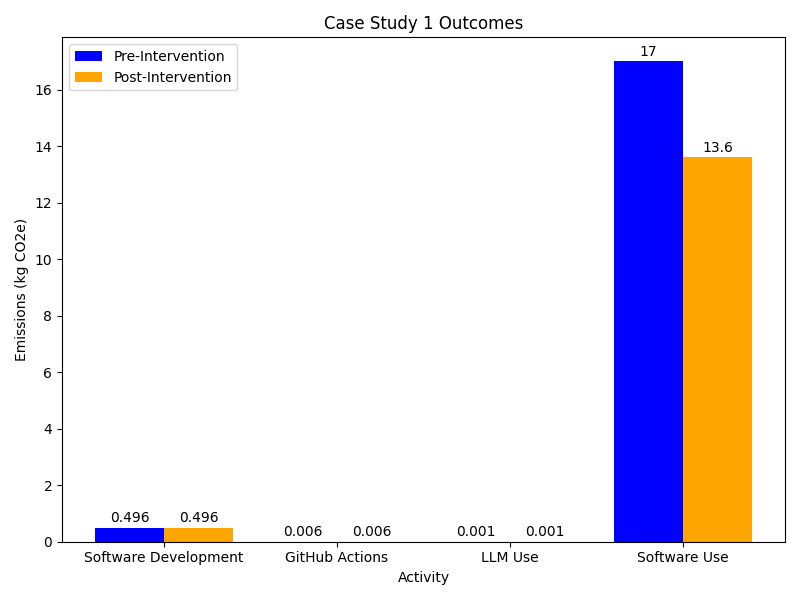
Reviewing the changes she’s implemented Celia estimates a reduction of around 20% in the emissions from usage of her package. That’s a weekly saving of around 3.5 kgCO₂e per week or an annual saving of around 175 kgCO₂e.
- Research software development can have significant environmental impacts.
- Measuring and estimating carbon emissions from research software development is important for identifying areas for improvement.
- GitHub Actions and LLMs should be used judiciously to avoid unnecessary emissions.
- Performance profiling can be a useful tool for identifying areas of code that could be optimised to reduce emissions.
- Providing good user documentation and support can help users to make more efficient use of software, reducing emissions from usage.
Content from Case Study 2 - Lab Scientist doing computational work
Last updated on 2026-07-29 | Edit this page
Overview
Questions
- What are the main carbon emission sources for a researcher conducting computational data analysis?
- How do data storage choices impact long-term carbon emissions in research projects?
- What are the trade-offs between using different LLM models for generating research code?
- How can hybrid storage strategies reduce carbon emissions while maintaining data accessibility?
Objectives
- Estimate carbon emissions from data storage, LLM usage, and computational processing using appropriate methodologies.
- Compare the carbon footprint of different storage technologies and LLM models.
- Evaluate the relative contribution of different activities to total research emissions and identify priorities for intervention.
- Design and implement emission reduction strategies including different storage strategies and appropriate LLM selection.
Scenario

Emma is aware that storing and processing large amounts of data generates a significant amount of carbon emissions. In order to reduce her research carbon footprint she wants to calculate the total emissions associated with her workflow and identify ways to reduce these emissions.
Collecting Information
Data Exploration (20 minutes)
Emma wants to learn more about each of the emission sources, focusing on the following areas of her digital work:
- Storing large amounts of scientific data
- Use of LLMs (online)
- Running data processing and analysis scripts
For each of these areas, how could Emma estimate or measure the associated emissions? What data would she need to collect in each case?
- Consider the different types of data storage and which ones are more suitable for Emma’s data.
- Think about Emma’s potential data management plan. What would be a realistic data management flow that Emma could adopt.
Data Storage
- Emma should first review her data management plan. How long is she going to keep the data for, how many copies and how much data would she need for active analysis.
- If Emma has particular storage devices in mind, she could look for PCF reports to get the embodied emissions and possibly a usage estimate. Such data is less readily available for storage devices, however. In the absence of PCF data, Emma could use some of the emissions estimates from sources such as those covered in episode 3. She will need to know the volume of data and the amount of time she’ll need to store it for.
Use of LLMs
- She could track which model she uses, and how many queries she sends, and the approximate size of the replies for use with the Hugging Face Ecologits calculator.
Data Processing and Analysis
- Looking for a PCF data sheet for her laptop will provide information about the embedded emissions. For the operational emissions she could choose between direct measurement with a power meter, use of a tool like codecarbon or estimation with the Green Algorithms Calculator. IIn the known context that operational emissions of laptops are low, it’s probably easiest to use the lowest effort method of the Green Algorithms calculator. She can always follow up with a more accurate method later, if the initial estimate seems significant. To do this, she’ll need an estimate of the CPU utilisation of her laptop and its specifications.
Analysis
Estimating Emissions (20 minutes)
Using the information below about Emma’s current workflow calculate an estimate of the carbon emissions associated with the Emma’s digital research activities.
Data Storage
- Her research will generate approx 3.5 TB of raw data for the duration of the project (5 years).
- She is planning to keep two copies of the raw data, which she will be storing on different HDDs.
- There will also be additional 400 GB of processed data per year that she will work with regularly. This adds up to 2 TB over the duration of the project.
- The data must be retained for 10 years after the end of the project, meaning that the data must be stored for a total of 15 years.
- Given that the lifespan of HDDs can reach 10 years in best case scenario, Emma will have to replace the HDDs at least once.
Use this table to estimate the emissions for storing her data on HDDs.
Use of LLMs
- Emma primarily interacts with an LLM via a browser chat window. She hasn’t paid much attention until now about which model she is using or how much she uses it. Checking now, the default model is GPT-5.4. She also keeps track of her usage during a session and finds that she sends 30 queries.
Use HuggingFace’s Ecologits calculator tool to estimate the emissions associated with Emma’s use of LLMs.
Running Scripts
- Emma is using her modern laptop and looks up the specifications for her model to get more accurate emissions. She finds that her laptop has a Core i5-1145G7 processor, with 4 CPU cores and 64 GB memory. Her analysis scripts are not parallelised so can only use up to 1 core. As she often leaves her scripts running overnight, she’s not sure exactly how long they take. For the next run she does she adds a command to record the total runtime which is 6 hours.
Use the Green-algorithms calculator to estimate the emissions emitted by Emma’s laptop.
- To estimate data storage, assume that the total 2 TB of processed data generated for the whole duration of the project (not 400 GB during the first year, 800 GB during the second year, etc.).
- If estimates for the GPT-5.4 model are not available, you can use the generic GPT-5 model estimate. Emma uses 30 as the number of queries but is not sure of the number of tokens that have been returned. Use the largest response size (15000 tokens) with the understanding that this is an overestimate.
- Use the Green-algorithms calculator with her CPU model running for 6 hours with 1 core.
The estimated emissions associated with Emma’s work, which she will be storing on different HDDs.flow are as follows:
Data Storage
\[ E_{HDDs} = E_{embodied}+ E_{operational} \\ E_{HDDs} = (3 kgCO₂e/TB \times 9 TB + 9 kgCO₂e/TB \times 9 TB) \times 15 \\ E_{HDDs} = 1,620 kgCO₂e \]
Storing the 9 TB data on HDDs will have associated carbon emissions approximately equal to 1,620 kgCO₂e in combined embodied and operational emissions, based on the average values within the emissions ranges she identified in this table.
LLMs Usage
Using HuggingFace’s Ecologits calculator tool and the GPT-5 model estimate gives a emissions of 10.8 gCO2e per query and running 30 queries generates 0.324 kgCO₂e. Assuming an average of 1 session (30 queries) per week over the 5 year course of the project that gives a total of 84 kgCO₂e.
Note that this estimate doesn’t include emissions from model training.
Running Scripts
Using the Green-algorithms calculator with her CPU model running for 6 hours with 1 core to find that the emissions emitted by her laptop - 53.20 gCO₂e each time. If she runs the similar analyses weekly over the 5 year course of the project, the total emissions would be 13.78 kgCo2e.
Taking Action
Based on the calculations above, storing research data and using LLM’s are the activities with the largest associated carbon emissions. At around 1,700 kgCO2e, these activities account to around a third of the emissions per-capita in the UK,according to the International Energy Association. While lower in comparison, the emissions linked to using LLMs to help write her code are not insignificant and are equivalent to charging a smartphone nearly 7000 times. With this in mind, Emma wants to develop an improved research workflow to reduce her digital carbon footprint.
Measures to Reduce Emissions (20 minutes)
Emma identifies several ways in which she can improve her data storage and LLM usage. In your groups, discuss any other measures you think could be implemented and what impact they might have.
Data Storage Changes
- Emma has heard that her institution provides tape-based cold storage options located in two different campuses, and which are intended for data that is not accessed very often. She decides to keep the two copies of the raw data on the LTO-tape based storage provided by her institution, with each copy being stored at a different site. This ensures the data is safe in case something happens with one of the storages. She decides to keep her processed data on HDDs, as she needs easy and fast access for analyses.
- Given that magnetic tape has negligible emissions when idle, we can assume that the total emissions from storing data on tape come from embodied emissions, estimated at ~0.07 kgCO₂e per TB. Keeping the two copies of raw data (7 TB) in the institution’s LTO‑tape storage facilities would therefore generate 7.35 kgCO₂, while keeping the 2 GB of processed data on HDDs would generate 360 kgCO₂. Therefore, the total costs associated with storing Emma’s research data would be 367.35 kgCO₂e.
Outcomes
A comparison of the emissions associated with Emma’s current workflow and the improved one can be found below:
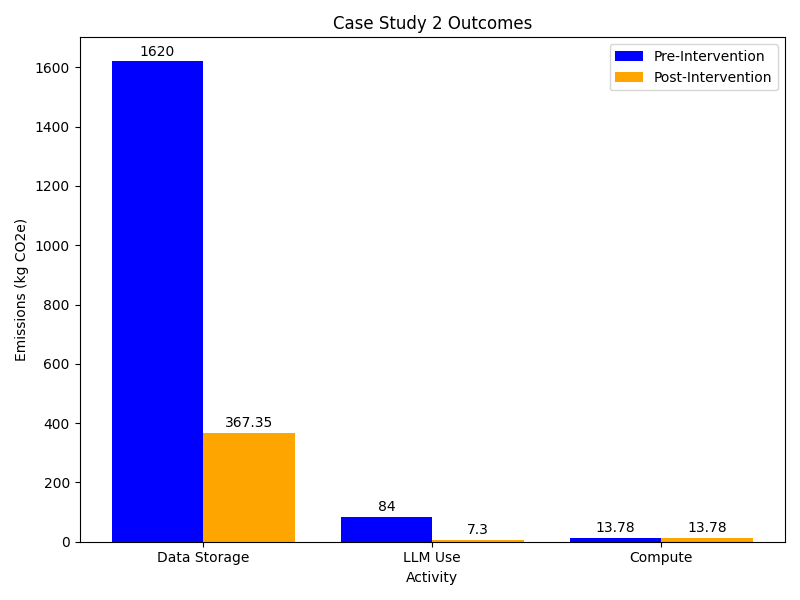
Adopting the improved workflow would result in a five-fold reduction in Emma’s digital carbon emissions. Particularly, moving from storing data on HDDs to a hybrid storage approach that includes both HDDs and LTO-tapes has the greatest impact on lowering emissions, saving around 1,250 kgCO2e, which is equivalent to the total annual electricity-related emissions of three average UK households.
- Storing large amounts of research data can have significant environmental impacts.
- Having a good data management plan and using appropriate storage medium can reduce the carbon emissions associated with storing data.
- Not all tasks require the most advanced LLM model. Switching from a reasoning model to a less powerful model for simple data processing and analysis scripts can also contribute to lowering carbon emission associated with digital research.
- While Emma’s improvements are substantial, they represent only one piece of a larger puzzle. For a life scientist, the total work-related emissions typically range from 4 to 15 tCO2e annually 2. These numbers are driven by carbon intensive activities, such as international travel, laboratory heating, ventilation and AC systems, and the heavy use of chemical reagents and single-use equipment.
References
- Winter N,The paradox of the life sciences: How to address climate change in the lab: How to address climate change in the la. doi: 10.15252/embr.202256683
- Woo, N.H. A comparative study of AI and human programming on environmental sustainability. Sci Rep 15, 39182 (2025). https://doi.org/10.1038/s41598-025-24658-5
- Data storage is often the dominant source of carbon emissions for researchers working with large datasets and long retention requirements.
- Adopting a tiered storage strategy — using LTO tape for archival data and HDDs or SSDs for actively accessed data — can reduce storage emissions by an order of magnitude.
- Choosing a smaller, task-appropriate LLM model can reduce AI inference emissions dramatically compared with using the largest available model.
- Defining a data management plan before a project begins helps avoid unnecessary data collection, replication, and long-term storage.
- Contextualising digital emissions alongside other research activities such as lab equipment and travel helps identify where reductions will have the greatest impact.
Content from Case Study 3 - HPC User
Last updated on 2026-07-29 | Edit this page
Overview
Questions
- What are the key sources of carbon emissions when using High Performance Computing facilities?
- How can HPC users estimate emissions when clusters provide different levels of carbon monitoring tools?
- What strategies can reduce carbon emissions from HPC workloads without compromising research throughput?
- How do workload optimization, resource selection, and job management affect carbon emissions?
Objectives
- Collect usage data across multiple HPC facilities and estimate associated carbon emissions using available tools and approximation methods.
- Analyze HPC workload patterns to identify wasted computation, optimization opportunities, and hardware efficiency differences.
- Evaluate trade-offs between computational speed and resource efficiency through benchmarking studies.
- Implement emission reduction strategies including code compilation optimization, workload benchmarking, better job validation, and strategic resource allocation.
Introduction

Hugh is working on several different research questions that requires the use of different simulation software. Choice of which software to use is usually driven by existing research data and the capabilities of different codes. Whilst he often makes use of software that has been pre-installed by system administrators, he sometimes has to compile packages himself.
In addition to simulation work, Hugh carries out data analysis and creates visualisations.
Hugh has access to 2 different HPC facilities he can make use of:
- a general purpose institutional cluster offering a mix of CPUs.
- a cluster providing targeted support for the atomistic simulation community.
Both facilities are heavily subscribed and Hugh tries to maximise his throughput at all times. Workloads on these clusters are submitted to a queue and will start running at an unknown time. Almost all of his workloads run for at least 48 hours.
Collecting Information
Data exploration (20 minutes)
Hugh wants to estimate the emissions associated with his HPC usage. What methodologies could he use? What data would be useful to collect?
Operational Emissions
- As Hugh does not have direct access to the clusters, he’s likely restricted from making direct measurements. It may be possible to incorporate codecarbon into his workflows but this may be challenging (e.g. the RAPL interface may not be accessible to users, multi-node jobs or shared-node jobs would need to be accounted for).
- An estimation methodology such as the Green Algorithms Calculator should be fairly readily usable. In this case Hugh should collect as much detail as he can about his resource usage on the system and the hardware.
- Another method for estimation would be if Hugh is able to get power draw data for the cluster. This information may be available from the system administrators, most likely in an aggregated form. Combined with some data or assumptions about system utilisation and carbon intensity an estimate could be derived based on his resource usage.
- Some HPC system may also provide tooling that reports job power draw or even carbon emission estimates.
- A key value to include is the Power Utilisation Efficiency (PUE) of the system. In most cases this is not published but may be available on request.
Embodied Emissions
- For a known set of hardware Hugh would likely be able to look up PCF data sheets to get estimates of the embodied emissions.
- As an end-user Hugh is dependent on information provided by the service or which he can gather himself. Most HPC services publish information regarding the type and amount of CPUs, GPUs, memory, etc. It is rarer for services to provide a full inventory including the exact models of servers, networking infrastructure, storage devices, etc., that would be required to calculate the embodied emissions of the service as a whole.
- Some services may publish an embodied carbon analysis.
Analysis
Estimating Emissions (20 minutes)
Hugh does some investigation and finds the below information:
General Background
DRAGONFLY is a cluster based in London. It doesn’t publish any sustainability information. The documentation pages provide some lists of the available hardware but these are fairly high level and don’t include specific CPU or server models.
LANCER is a cluster based in Wales. Its documentation has some dedicated information on sustainability including a GHG analysis of the cluster. This includes an embodied emissions analysis as well as total power usage. Most usefully Hugh finds that the cluster provides a tool for users to estimate the carbon emissions of their workloads. This tool has been tested and calibrated for the cluster so should be fairly accurate.
HPC workloads
Hugh is confident that his simulation workflows form the vast majority of his HPC usage so he decides to focus on these. He tracks the total CPU-hours spent on different clusters and the different simulation codes used on each one. He also gets the total estimated emissions for LANCER using the provided cluster tooling.
| Cluster | Simulation Code | Total CPU-hours | Notes | Emissions (kgCO₂e) |
|---|---|---|---|---|
| DRAGONFLY | GROMINZ | 45,000 | Self-compiled | |
| ORANGE | 30,000 | |||
| LUMMPS | 20,000 | |||
| LANCER | GROMINZ | 60,000 | Self-compiled | 32 |
| ORANGE | 40,000 | 21 | ||
| LUMMPS | 75,000 | 40 |
Whilst collecting the above data Hugh also notes that around 15,000 CPU-hours were wasted on from some workloads on LANCER that he hadn’t setup properly and which had to be repeated.
By scaling the emissions estimates for LANCER by the relative resource usages estimate the emissions for each code on DRAGONFLY. Use the result to estimate Hugh’s annual emissions. Also estimate the emissions from the 15,000 wasted CPU-hours. What are the limitations of the estimates produced using this method and how could it be improved?
Embodied emissions
Whilst the embodied emissions for the clusters are relevant to calculating the carbon impact of his work, Hugh notes that these are a sunk cost that he is unable to impact at this point. LANCER provides some data but DRAGONFLY doesn’t provide nearly enough information to make much headway. Hugh emails the admins of DRAGONFLY but they’re unable to provide him with more information. Based on this Hugh decides not to consider embodied emissions in his analysis.
Taking GROMINZ as an example:
\[ Emissions_{DRAGONFLY} = \frac{Resources_{DRAGONFLY}}{Resources_{LANCER}} * Emissions_{LANCER} \\ Emissions_{DRAGONFLY} = \frac{45000 CPUhours}{60000 CPUhours} * 32 kgCO_2e \\ Emissions_{DRAGONFLY} = 24 kgCO_2e \]
Applying this to the other simulation codes gives:
| Cluster | Simulation Code | Total CPU-hours | Notes | Emissions (kgCO₂e) |
|---|---|---|---|---|
| DRAGONFLY | GROMINZ | 45,000 | Self-compiled | 24 |
| ORANGE | 30,000 | 16 | ||
| LUMMPS | 20,000 | 11 | ||
| LANCER | GROMINZ | 60,000 | Self-compiled | 32 |
| ORANGE | 40,000 | 21 | ||
| LUMMPS | 75,000 | 40 |
This gives a total 144 kgCO₂e from the two week period.
To better understand what this figure means Hugh, takes his total emissions figure from the two weeks and compares it with other emissions sources. He finds that 144 kgCO₂e is approximately equivalent to driving for around 500 miles in a petrol fueled car1.
Scaling the number for two weeks up to a full year, Hugh gets a total of 3.5 TCO₂e. He notes that this is close to the UK per-capita emissions for energy generation. This means the electricity demands of his work is nearly equivalent to those of whole second person.
Deriving an estimate for the wasted emissions is fairly simple is it makes a quarter of his use of GROMINZ on LANCER - a total of 8 kgCO₂e.
The limitations of this methodology come from assumping that usage of a given set of CPU-hours on each system leads to the same amount of carbon emissions. In practice factors such as the PUE, carbon intensity, CPU model, etc. mean this is unlikely to be the case. The estimate could be improved if Hugh can get information like the PUE or relevant carbon intensity values for both clusters.
Taking Action
Measures to Reduce Emissions (20 minutes)
Hugh takes his emissions estimates and comes up with some steps to help to reduce emissions.
In your groups discussion any other measures that Hugh could implement and what impact they might have. What steps could Hugh take to get better data to refine the emissions estimates he’s made so far?
Hugh Takes Action
Based on the data gathered above Hugh observes:
- He spends the most CPU-hours on LANCER.
- He spends the most CPU-hours using GROMINZ.
This suggests Hugh will get the most impact by focussing his efforts on these areas. Hugh wants to be able to measure the impact of any changes he makes which can be best done using the emissions tooling on LANCER. He’s also confident that most changes he makes on LANCER will be transferable to DRAGONFLY even if he can’t measure the impact so directly there.
In order to minimise his emissions Hugh realises he can both improve the efficiency of the simulations he performs and try to reduce the overall amount of simulation.
Reducing Simulation
The 15,000 wasted CPU-hours of simulation are an obvious initial target. Hugh reviews the jobs that went wrong and identifies the root causes. He then adjusts his workflows to prevent them happening again. To help in the future, he agrees with a member of his research group that they will double check each others simulation inputs before starting significant new simulation projects. With these measures Hugh estimates that he may be able to reduce his wasted CPU-hours by half.
Hugh’s work requires running simulations for many individual timesteps but it’s often not obvious in advance how many timesteps are required. Reviewing some of his recent projects Hugh concludes that by monitoring his workloads more closely he can terminate some of them earlier. Hugh estimates this could reduce the CPU-hours used per project by 10%.
Optimising Workloads
Hugh notes that GROMINZ is less commonly used in his field and so he has had to compile it himself on both clusters. Hugh doesn’t have a lot of experience doing this and had to piece together how to do it with some online searching and notes from a old colleague. Hugh reaches out to the authors of the code who are able to give him some general advice but can’t offer tailored help. Hugh also gets in touch with the local Research Software Engineering team at his institute who are more familiar with the clusters and are able to provide a small amount of effort to help. Together they identify some tweaks to the compilation and manage to get a 5% speed boost.
To better understand the differences between the codes and clusters he uses Hugh carries out some performance benchmarking. He runs simulations with all of his simulation codes across both clusters. Hugh carefully designs these simulations to be short, so as to not generate too many emissions, but representative of typical workloads. A key finding he identifies is that GROMINZ runs 15% faster on LANCER when using the same number of CPU cores. Meanwhile, ORANGE and LUMMPS don’t show much difference between the two clusters. Hugh realises he can work more efficiently by shifting as much of his work using GROMINZ to LANCER as possible.
Most of Hugh’s simulations require him to run jobs in parallel, using many CPU cores and cluster nodes at the same time. Hugh is familiar with the fact that as his jobs use increasing amount of resources there is a trade-off in computational efficiency. With some of his current projects Hugh realises he has not put much thought into choosing the resources used. Taking one of his recent projects Hugh carries out some benchmarking by running the same simulation using different sets of computational resources. He identifies that for that set of simulations he could have reduced his use of computational resources by 20% whilst only losing 10% speed. Hugh resolves to carry out this sort of benchmarking for all new projects he starts to identify a good trade-off between speed and efficiency.
Outcomes
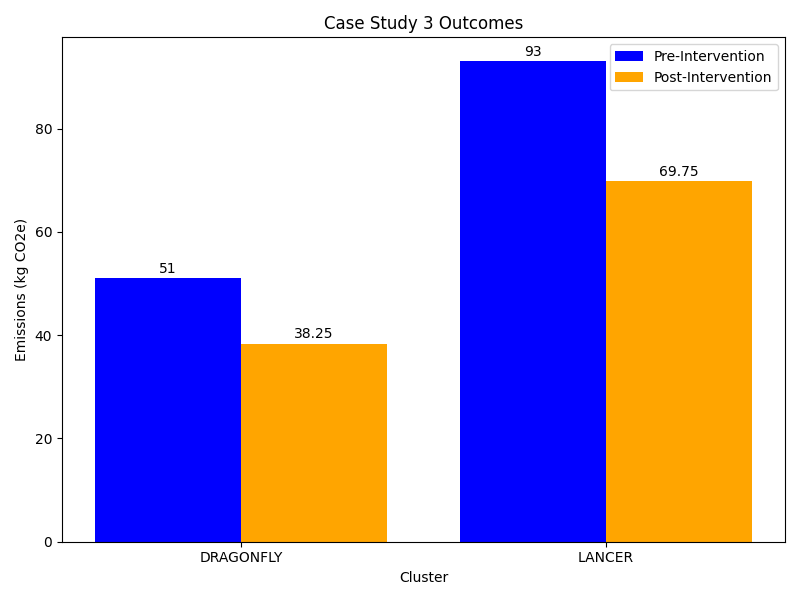
Putting all of the above steps together Hugh estimates that he can reduce his overall use of CPU-hours by 25% across both clusters. This would result in a saving of ~36 kgCO2 from his two week data collection period. Expanding this over a full year gives a reduction of nearly 936 kgCO2. Hugh also continues to collect data on his HPC workloads so that he can assess the impact of the changes he’s made in the future.
Hugh shares his findings with his colleagues in their regular group meeting. Several of his colleagues use the same clusters and simulation codes as him so they are easily able to make use of Hugh’s work.
Hugh also contacts the team maintaining DRAGONFLY highlighting the utility of tools to measure carbon intensity data. The team promises to explore how they can add some more functionality to DRAGONFLY.
References
- Calculated from an emissions rate of 0.27849 kgCO₂e/mile. This is emissions rate reported for an average car in 2025 by the UK Government Conversion Factors for greenhouse gases dataset.
- Tracking actual resource usage across HPC facilities is essential before attempting to measure or reduce associated emissions.
- Wasted computation from failed or misconfigured jobs is a significant and avoidable source of emissions; validating job inputs before submission reduces this waste.
- Different HPC clusters vary in carbon efficiency; benchmarking workloads across available facilities helps identify where to direct them for lowest impact.
- Benchmarking parallel job resource allocation can reveal configurations that reduce energy use with only a modest speed penalty.
- Sharing findings on emissions and efficiency with colleagues and facility operators multiplies the impact of individual actions across a research community.
Content from Case Study 4 - GPU Computing User
Last updated on 2026-07-30 | Edit this page
Overview
Questions
- How can prior training run data and local benchmark timings be used to estimate the carbon footprint of a new model before committing to a full training run?
- What is the carbon cost of training a deep learning model naively compared to using optimisations such as transfer learning, mixed precision, and early stopping?
- How do ML-specific choices — optimiser, batch size, model architecture — affect both GPU memory requirements, utilisation efficiency, and carbon emissions?
- What are the trade-offs between running training jobs on cloud GPU infrastructure versus a local workstation?
Objectives
- Estimate the carbon footprint of a deep learning training run using proxy data from a previous run and local benchmark timings.
- Identify sources of wasted computation in a naive model training workflow and prioritise opportunities for reduction.
- Evaluate the carbon impact of ML optimisations including transfer learning, mixed-precision training, early stopping, and model architecture choices.
- Compare the carbon cost and practical trade-offs of local versus cloud GPU training.
Scenario

His primary responsibilities are:
- The deployment of cutting edge deep learning models
- Periodic maintenance of models to add features and prevent model drift
- The curation and storing of large datasets
To do his work, Miguel often trains and fine-tunes models on his local GPU-equipped workstation when the job is small enough, and offloads larger jobs to dedicated cloud GPU compute providers.
Miguel is tasked with deploying a new model to the cloud, based on the architecture of an existing model he deployed last year. The existing model was trained with vast quantities of real animal images, and is already quite competent at feline-based image processing. It performed simple detection of cats in images, but the new model must produce bounding boxes. The previous training script was very crude, and simply passed the entire dataset through the model in batches of 256, for exactly 100 epochs of stochastic gradient descent (SGD), with no regularisation.
Based on his experience preparing the previous model, he knows that his workstation’s GPU will not have enough memory to train the similarly-sized derived model with a reasonable batch size in its current form. Like last time, he will aim to offload the training of the model to a cloud GPU compute provider, however local development and fine-tuning will still be possible using a very small batch size.
Before committing cloud compute resources, Miguel wants to estimate the carbon cost of his planned training run and explore ways to reduce it — both to keep emissions low and to avoid an expensive wasted run if something goes wrong.
Collecting Information
Data Exploration (20 minutes)
Miguel’s work consists of developing and fine-tuning the model on his local workstation, followed by training and deploying the model on cloud infrastructure. How might Miguel estimate the associated carbon emissions? What data will be required, and how might he find such data?
There are various methods Miguel can build a picture of carbon emissions with, including real-time measurement, prediction tools and extrapolaring from known data.
- Realtime measurement can be performed locally using either a physical meter measuring power usage directly from the mains socket, or by wrapping code with power monitoring software packages such as CodeCarbon. Realtime measurement of cloud jobs may also be possible, since many cloud providers offer infrastructure for querying live energy usage of running jobs.
- Carbon data from training the previous model may be used as surrogate data for the new model, given their near-identical architecture. If carbon data for the previous run was not recorded, then predictive tools can be used to estimate it. For example, the Green Algorithms Calculator may be used to estimate carbon data of a previous job given its runtime, server location and compute requirements.
Analysis
Estimating Emissions (20 minutes)
Miguel uses 2 methods to get estimates up-front of the carbon footprint of a full training run.
Local Development and Testing
Miguel is unable to train the model at target batch size of 256 on his workstation, but information from a smaller run might still be useful for estimating the carbon emissions of the larger run. He decides to use CodeCarbon to measure the power consumption of his CPU and GPU for a single training epoch, using 1% of the training data, with a batch size of 32.
CodeCarbon reports an energy usage of 430 Wh over 5 hours during this test run.
Use this value to estimate the energy required and carbon emissions for a full training run.
Previous Training Runs
Given the similarity of the new model to the old one, data obtained during the training run of the previous model may be used as surrogate data for estimating the carbon usage of the newer model. He remembers that the previous job ran for approximately 72 hours, and used the Azure (Southern UK) datacentre with the following hardware:
- 64 GB of available host RAM
- Eight virtual cores of an Intel Xeon Platinum 8260 CPU
- One whole NVIDIA Tesla V100 GPU
Use the Green Algorithms
Calculator to estimate the energy usage and carbon footprint of
training the new model using information obtained from training the
similar previous model. For this exercise, select data version
v3.0 in the top right of the calculator page.
Miguel’s results for the two estimate methods are as follows.
Local Development and Testing
Since the test run used 1% of the training data, scaling the measured energy up to the full dataset gives:
\[ 430 \text{ Wh} \times 100 = 43{,}000 \text{ Wh} = \textbf{43 kWh} \]
Using the 2025 UK average carbon intensity of 126 g/kWh this gives a total of 5.4 kgCO2e.
Previous Training Runs
Plugging in the runtime, hardware and location of the job into the calculator, it estimates that 30.55 kWh of energy was required to train the model, with a carbon footprint of 7.06 kgCO2e.
Comparing
The two methods give estimates of 43 kWh (5.4 kgCO₂e)and 30.55 kWh (7.06 kgCO₂e), which are in rough agreement given the approximations involved. Some differences:
Energy estimates (43 vs 30.55 kWh): The local benchmark is likely an overestimate of the cloud run’s energy consumption. The test run uses a smaller batch size and local consumer-grade hardware, both of which tend to be less energy-efficient than the cloud data centre’s server-grade GPUs. The Green Algorithms Calculator estimate is based on component TDP values rather than real utilisation, which tends to overestimate, partially offsetting this.
Carbon intensity (5.4 vs 7.06 kgCO₂e): The local estimate uses the UK average grid intensity (126 gCO₂/kWh), while the Green Algorithms Calculator uses a location- and provider-specific value for Azure Southern UK. The latter also applies a PUE factor to account for data centre cooling and infrastructure overhead — an overhead not captured by CodeCarbon on the local workstation.
Strengths and weaknesses:
| Local benchmark (CodeCarbon) | Surrogate data (Green Algorithms Calculator) | |
|---|---|---|
| Energy measurement | Directly measured (actual power draw) | Estimated from TDP (may over/underestimate) |
| Hardware match | Different from cloud run | More representative of planned training |
| Carbon intensity | UK average | Provider- and location-specific |
| Overheads accounted for | No | Yes |
| Overall | Good for bounding the estimate; captures real utilisation on local hardware | More representative of the actual cloud run |
Additional data that would improve both estimates: real-time carbon intensity at the time and location of the run; GPU utilisation metrics from the cloud provider; the data centre’s actual PUE; and actual energy billing data from the cloud provider if available, as some providers now expose this directly.
Given the above, the surrogate data estimate of (7.06 kgCO₂e) is the more representative figure for the planned cloud training run, as long as it’s run in the same location, and we’ll use it as the baseline going forward.
Taking Action
Reducing emissions from model training (20 minutes)
Miguel’s estimates suggest that a naive training run — repeating the same approach used for the previous model — would cost approximately 7.06 kgCO₂e. In your groups, discuss what strategies Miguel could use to reduce this. Consider:
- Are there any aspects of the naive training approach that represent unnecessary computation?
- What ML-specific techniques could reduce the number of training steps required?
- What are the trade-offs between training on a cloud GPU versus a local workstation, from both a carbon and a practical perspective?
From his observations, Miguel formulates a plan. It is clear to him that it is entirely unnecessary to train a new model from scratch, given the prior model is already quite competent at processing cats. The existing model can readily be adapted by appending a new head for cat bounding-boxes, and transfer learning techniques can be utilised to further fine-tune the model to a reasonable accuracy.
Miguel begins to quantify the computational resources required to train the revised model. With bytes per value \(b = 4\), number of trainable parameters \(P ≈ 26,000,000\), batch size \(M = 256\) and number of activation state variables for all layers \(N ≈ 11,000,000\):
| Memory Type | Formula | Size (bytes) |
|---|---|---|
| Parameters | \(P \cdot b\) | \(104,000,000\) |
| Gradients | \(P \cdot b\) | \(104,000,000\) |
| Optimiser State | \(P \cdot k \cdot b\) | \(0\) |
| Activation State | \(M \cdot N \cdot b\) | \(11,264,000,000\) |
An extra \(20\% ≈ 2,294,400,000\) bytes overhead for internal ML framework usage is also included, totalling approximately \(12.8\) GB. In general, there is an optimiser memory factor \(k\), but plain SGD has no internal state, hence \(k = 0\) for now. With this estimation framework, he is able to know upfront roughly how much GPU memory the job will require, as a function of batch and layer size. Whilst the SGD optimiser reduces the memory required to train the model, via \(k = 0\) above, the prospect of earlier convergence using an alternative optimiser with \(k > 0\) may make the memory increase overall worthwhile.
He begins experimenting, appending the new bounding-box head and starting training, keeping the trainable parameters in the body fixed, and gradually relaxing them as training progresses. He modifies the training script to back up training state after each epoch, to avoid starting again on software crash or hardware failure. He is able to greatly increase the convergence rate with a moderate increase in required memory (\(k = 2\) in the memory equations) using the more sophisticated Adam optimiser, and further improves it by adding a learning rate decay. With the convergence rate noticeably increased, he adds logic to terminate early once the model’s loss function converges. The 32-bit floating-point numbers for activation state and gradients are switched to 16-bit, increasing operator speed and halving the memory required for both.
Miguel takes another look at the model’s architecture, and notes that it is very large for its stated purpose, with many channels per convolutional layer, and very wide fully connected layers in the head. He wonders if the model can be pruned to enable training on his workstation, instead of relying on the cloud provider. Noting again that the model is very large for its stated purpose, Miguel adds L1 (Lasso) regularisation to reduce redundant activation, allowing many (now-unused) activation units to be removed from the model entirely, resulting in a \(20\%\) memory saving.
With the model now small enough to run efficiently on his workstation, Miguel runs a short test-run to check that all is well before the main training run. He notes that even on his relatively small GPU, the model is not utilising his GPU entirely. Since a partially-occupied GPU is disproportionally less efficient than an occupied one, he estimates the memory requirements of this revised model, with the aim of maximising batch size to better-utilise the GPU. With new values \(b_{16} = 2\), \(b_{32} = 4\), \(P ≈ 20,800,000\), \(k = 2\), \(M = 256\) and \(N ≈ 8,800,000\):
| Memory Type | Formula | Size (bytes) |
|---|---|---|
| Parameters | \(P \cdot b_{32}\) | \(83,200,000\) |
| Gradients | \(P \cdot b_{16}\) | \(41,600,000\) |
| Optimiser State | \(P \cdot k \cdot b_{32}\) | \(166,400,000\) |
| Activation State | \(M \cdot N \cdot b_{16}\) | \(4,505,600,000\) |
and extra \(20\% ≈ 959,360,000\) bytes overhead, totalling approximately \(5.4\) GB only. Indeed, Miguel finds he can increase batch size even up to \(M = 728\) before the \(16\) GB of memory from the previous job comes close to full, potentially tripling job speed on the same hardware.
These experiments highlight the dramatic computational efficiency increases that can be achieved with careful optimisation of the job. Naive implementation of training and inference can have a considerably higher carbon footprint, requiring larger GPUs and longer run times, while carefully optimised workflows can be run very quickly and be small enough to run on local hardware.
It can often be the case that running AI workflows on cloud providers has a smaller carbon footprint than running on local hardware. The energy efficiency measures of datacentres make operational carbon relatively lower than smaller dedicated hardware setups, and embedded carbon can be lower using existing datacentre hardware, compared to buying and decommissioning in-house hardware. The flipside is that one looses the ability to choose when a job is executed, meaning demand shifting to off-peak times is no longer an option. In either case, Miguel’s optimisations have had a huge effect on the model’s carbon footprint, and have afforded him the choice of using either, depending on the circumstances.
Outcomes
After completing his optimisations Miguel runs some more tests and finds an 83% reduction in computation time running on the same hardware. He uses this factor to estimate the carbon savings of training his models in the cloud.
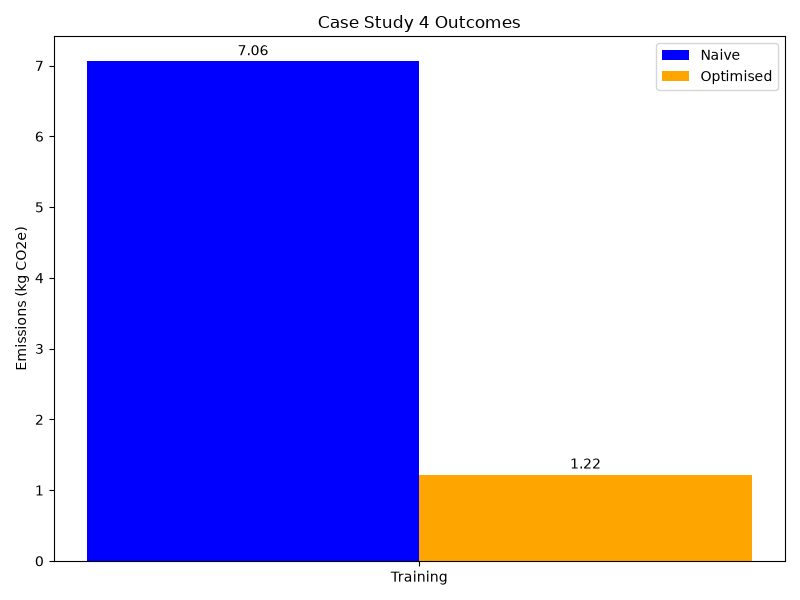
The table below summarises the key changes Miguel made:
| Naive approach | Optimised approach | |
|---|---|---|
| Training strategy | From scratch (100 epochs, full dataset) | Transfer learning + early stopping |
| Optimiser | SGD | Adam with learning rate decay |
| Numerical precision | FP32 throughout | Mixed precision (FP32/FP16) |
| Estimated power consumption (cloud) | 30.55 kWh | 5.3 kWh |
| Carbon footprint (kgCO₂e) | 7.06 | 1.22 |
- Prior training run data and local benchmark timings can be combined to estimate emissions before committing to an expensive full training run.
- Naive ML training workflows often contain significant avoidable computation — training from scratch when transfer learning is possible is a common and costly example.
- ML-specific optimisations (transfer learning, early stopping, mixed precision, model pruning) can reduce both training time and GPU memory requirements, often by an order of magnitude.
- Maximising GPU utilisation through right-sized batch sizes improves energy efficiency; a partially-occupied GPU is disproportionately less efficient than a fully-occupied one.
- Cloud training offers lower operational carbon through data centre efficiency but removes the option to demand-shift; local training restores that flexibility at the cost of higher embodied emissions per unit of compute.
Content from Summary
Last updated on 2026-06-22 | Edit this page
Overview
Questions
- What are the key concepts and strategies covered in this course for reducing carbon emissions in digital research?
- How can the measurement and estimation methodologies learned in this course be applied to your own research?
- What are the most impactful changes you can make to reduce emissions in your specific research context?
Objectives
- Summarize the main sources of carbon emissions in digital research and evidence-based strategies to reduce them.
- Analyze your own research workflows to identify emission sources and prioritize reduction opportunities based on effort and impact.
- Develop a practical plan to measure, estimate, and reduce carbon emissions in your own research activities.
- Evaluate potential emission reduction measures for your work in terms of feasibility, effort required, and likely impact.
Summary
These materials have introduced the relationship between digital research activities and sustainability. Digital infrastructure is increasingly becoming a more prominent component of global emissions with research as a significant contributor.
We have looked at ways to measure and understand the energy usage and emissions associated with consuming computational resources and examined impactful strategies to reduce emissions. Many of the emissions reduction measures align closely with well established best practices providing additional motivation for their adoption.
The case studies have provided an opportunity to apply this knowledge in the context of more realistic scenarios where imperfect information and practical constraints come into play.
Sustainability in your Research
Making use of the materials in this course, consider the impact of your own research work. Here are some questions to help you get started.
- What methodoligies might you use to measure or estimate emissions?
- What additional data might you need to gather?
- Which aspects of your work generate the most emissions?
- What changes could you make to reduce emissions?
- Can you categorise potential changes both in terms of effort and impact?
- Digital research infrastructure is a growing contributor to global carbon emissions, but individual researchers can take meaningful action to reduce their impact.
- Measuring or estimating emissions is the critical first step before designing effective reduction strategies.
- Many emission reduction measures align with established best practices in software engineering, data management, and research methodology, providing additional motivation for their adoption.
- Sustainable digital research requires ongoing monitoring and adaptation as workflows, tools, and infrastructure evolve over time.